
Arena of Valor Lag Fix Tool v3: Universal Support for All Seasons

Key Takeaways
- Version 3 Optimization: Introduces direct thread prioritization and CPU/GPU scheduling tailored to the Arena of Valor (Liên Quân Mobile) package (
com.garena.game.kgvn), eliminating frame dips and micro-stutter during intense 5v5 teamfights. - Zero Game File Alterations: Operates strictly at the Android Runtime scheduler level without modifying files inside
Android/dataorobb, guaranteeing 100% account safety. - Update Resilience: Stays functional across new tournament seasons, hero balance patches, and map updates due to fixed package name binding.
- Environment Setup: Runs through Brevent or LADB (Android 11+ via Wireless Debugging) or local terminal emulators (Android 10 and older).
Following up on previous optimization scripts, the Arena of Valor (Liên Quân Mobile) Lag Fix Tool v3 is designed to stabilize frame rates on entry-level and midrange Android hardware. In competitive 5v5 MOBA matches, decisive moments such as major objective clashes around the Dark Slayer or massive teamfights involving multiple ultimate abilities put heavy strain on mobile chipsets. This v3 release fine-tunes Android process priorities directly to maintain smooth, steady frame pacing.

Key Improvements in the Version 3 Release
Compared to earlier versions, version 3 focuses on practical rendering bottlenecks encountered in modern game versions:
- Graphics Pipeline Prioritization (CPU/GPU Affinity): The scheduler assigns the active
com.garena.game.kgvnthread group to top-tier performance cores, preventing the CPU governor from throttling during extended team clashes. - Directional Skill Touch Responsiveness: Reduces touch sampling input delays in the Android display driver stack, resulting in snappier skill shots, flicker casts, and defensive maneuvers.
- Buffer Swap Pacing: Smooths out Android SurfaceFlinger buffer cycles to eliminate sudden micro-stutter when complex visual spell effects collide simultaneously.
Frequently Asked Questions on Safety and Compatibility
Will Using This Optimization Script Risk an Account Ban?
No. Anti-cheat protections in Arena of Valor monitor modified APK packages, internal game storage edits (hack maps), or memory injection tools. This shell script does none of that. It only communicates with the Android operating system to adjust task scheduling priorities via ADB, leaving game binaries untouched.
What Sets Version 3 Apart from Versions 1 and 2?
While earlier releases addressed general system background bloat, version 3 targets the specific rendering structure of Arena of Valor, while also including a streamlined restore script for quick rollbacks.
Download Arena of Valor Lag Fix Package v3
ZIP archive containing the performance tuning scripts and the default restore script
osteup
Step-by-Step Installation and Execution Guide
Step 1: Set Up an Execution Environment
Android requires shell-level permissions to execute command scripts. Choose an application compatible with your phone's Android version:
| Android Version | Recommended App | Activation Method | Reliability |
|---|---|---|---|
| Android 11, 12, 13, 14+ | Brevent, LADB, Shizuku | Wireless Debugging pairing directly on device | 100% (Recommended) |
| Android 10 and older | Ostebox, Qute, Termux | One-time PC ADB pairing or local terminal | Device-dependent |
Step 2: Extract Archive to Storage
After downloading Fixlaglienquanv3.zip, extract its contents using ZArchiver, Files, or MT Manager. Ensure the extracted files sit inside the main download directory:
/storage/emulated/0/Download/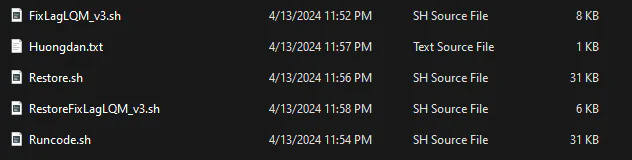
Step 3: Run the Optimization Script
Open Brevent (or your chosen terminal). Navigate to the Exec Command section in the menu.
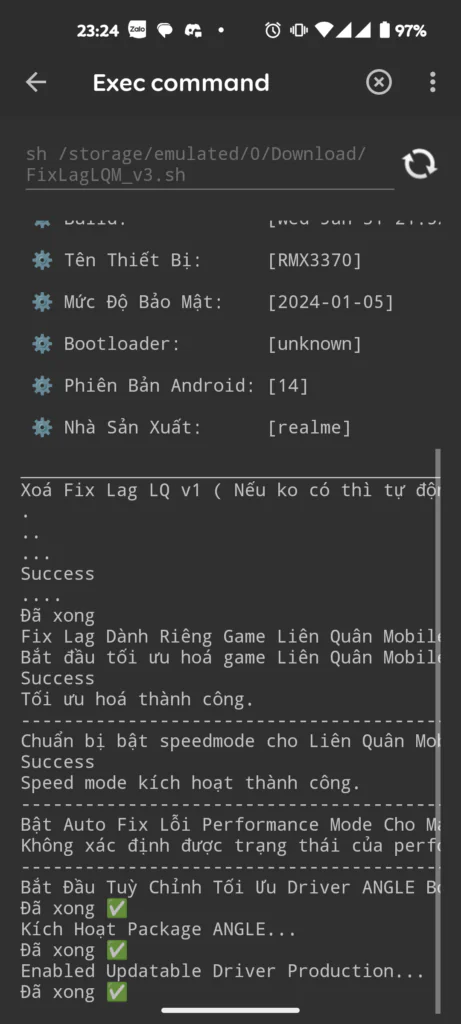
Enter the following command line and press run:
sh /storage/emulated/0/Download/Runcode.shNote: If your extraction tool placed the script inside a subfolder named Fixlaglienquanv3, use this command instead:
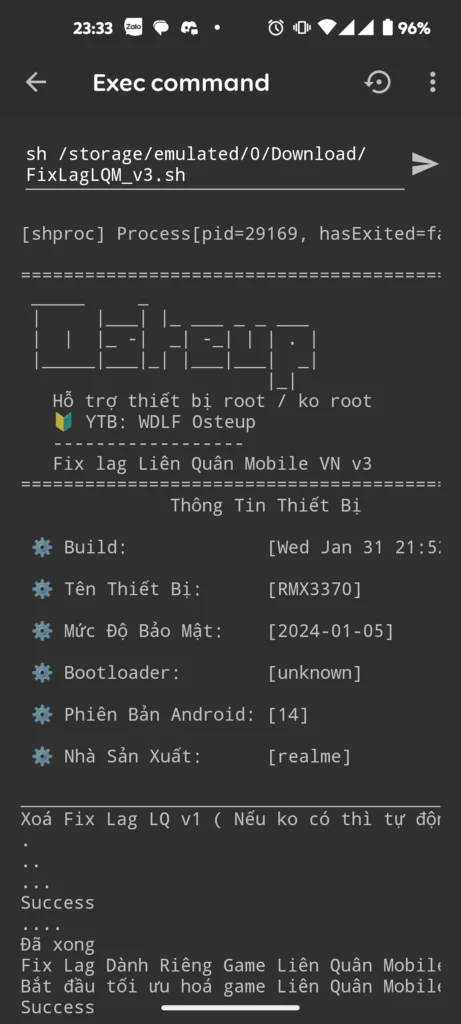
sh /storage/emulated/0/Download/Fixlaglienquanv3/Runcode.shWait for the terminal to print completion feedback with an exit code of 0, confirming that the new process scheduling priorities are active.
Step 4: Reverting Back to System Defaults
To undo all adjustments and return your phone's operating parameters to factory defaults, run the restoration command:
sh /storage/emulated/0/Download/Restore.shTroubleshooting "No Such File Or Directory" Errors
If the terminal prints No such file or directory, check these common filesystem points:
- Check folder letter casing: Linux-based Android filesystems are case-sensitive. If your storage folder is named
download(lowercase), change the command tosh /storage/emulated/0/download/Runcode.shor rename the directory toDownload. - Verify exact file path: Open your file manager to confirm whether
Runcode.shsits directly insideDownload/or inside an additional subfolder.
Frequently Asked Questions (FAQ)
Do I need to re-run the command after rebooting my device?
Because non-root ADB commands do not alter protected read-only system partitions, Android may reset certain scheduler parameters on a full reboot. If you notice stutter returning after restarting your phone, simply open Brevent and run the command again.
Does this cause overheating or fast battery drain?
The script maintains balanced clock speeds to avoid sudden frame drops during combat. While the device may feel slightly warmer during prolonged gaming sessions, standard power profiles resume automatically once the match ends and the game is closed.
Can this be used alongside low-end graphical mods (Lite patches)?
Yes. The script optimizes system-level resource scheduling, while in-game Lite mods lower graphic asset overhead. Pairing both often provides the best possible performance on older chipsets.
Launch Arena of Valor and queue into a ranked match to test the improved frame pacing and touch precision. Good luck with your rank climb!
Related Articles

BrotX Optimizer v7: Rootless Android System Tuning via Shizuku ADB
Guide to rootless Android system tuning with BrotX Optimizer v7 via Shizuku ADB: enable ANGLE Vulkan GPU, 0ms floating window touch, 80% charge protection, and 58 flags.

iOS Debloat Script: Optimize Performance, Battery Life and Gaming FPS on Jailbroken iPhone
Complete guide to perf.sh iOS debloat script disabling 100+ telemetry and background daemons to reclaim RAM, eliminate thermal throttling, and boost gaming FPS.

OOptimize: Android 7-15 Gaming Tweaks (Root & No-Root)
Optimize SurfaceFlinger and GPU Vulkan pipeline on Android 7-15 with OOptimize: stabilize FPS, eliminate frame drops, and minimize touch input latency.

RAM Purger: Stop Background Processes & Boost Android Gaming Like iPhone
Complete guide to the rootless RAM Purger (frozen.sh) shell script terminating 400+ background app tasks to reclaim RAM and eliminate frame drops on Android.
Comments(7)
Sign in to join the conversation
Sign in with Google, Facebook or Email to leave a comment and get notified of replies.
Nó hiện không hỗn trợ trên android 10 thì sao
Cho xin link vs làm ơn vượt kiểu đéo j ý ư s chế v ra
Cài xong khởi động lại có mất ko bạn?
Nó bị lỗi này fix ntn ạ cmd: Failure calling service settings: Failed transaction (2147483646)
Sao em chạy code nó lại ra cái phần smooth ui + touch vậy anh ko ra phần fix lag lq