
Control Background Apps on Android via OPS ADB Shell Commands

- Use OPS commands via ADB shell to control which apps are allowed to run in the background.
- Supports Android 7.0 and above; no root required.
- Reduces RAM load, minimizes stuttering, and extends battery life.
- Incorrect settings can delay notifications or incoming calls — read the included guide carefully before applying.
This guide walks you through using OPS commands inside ADB shell to manage which app packages are allowed — or blocked — from running in the background on your Android device.
Introduction
Compatible with Android 7.0 and above, this method lets you configure background execution permissions per app package, giving you fine-grained control over what runs when you're not looking.
Benefits of tuning background apps
- Smoother device performance with fewer background processes.
- Less stuttering during gaming or daily use.
- Lower battery drain from apps running silently in the background.
- Reduced device temperature.
- More stable and snappier system over time.
- Better overall optimization compared to out-of-the-box settings.
- Less RAM pressure from unwanted background services.
Drawbacks to keep in mind
- If you block background access for messaging or phone apps, you may experience delayed notifications or missed calls.
- Applying changes without reading the guide carefully may produce unexpected results.
Follow the instructions in the file and you won't run into any of these issues. The commands work well when used correctly.
What You Need
If you have a computer
- A USB cable to connect your phone to the PC.
- ADB set up on your computer (a setup package was shared previously on the channel).
- The Android phone you want to tune.
If you don't have a computer
- Wireless debugging enabled (requires Android 11 or above).
- One of the following apps to run ADB commands: ostebox, LADB, or Brevent.
Installation & Usage
Download the file below and read the usage guide inside it before applying anything. Since this knowledge is shared for free, please use the shortlink to get the file.
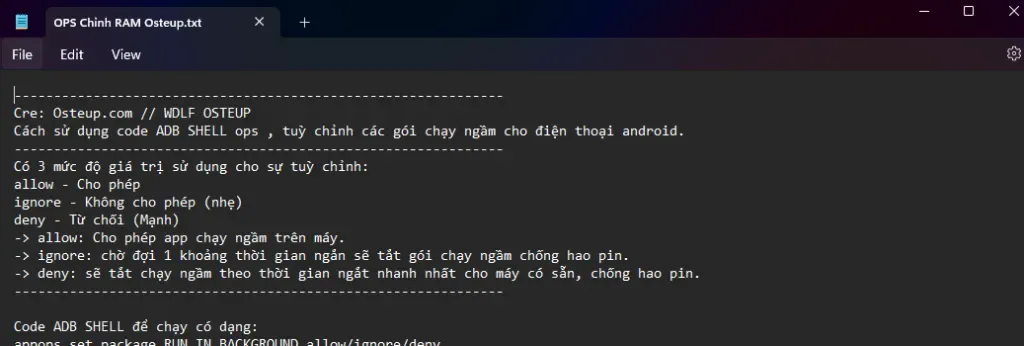
The file is fairly detailed, so take the time to read it fully before running anything. The download contains a .txt file.
OPS RAM Tuning — Osteup
Guide file with OPS commands for ADB shell to manage Android background app execution
osteup
Usage is straightforward: run the commands from the file and apply them to whichever packages you want to manage.
A detailed walkthrough is also available on the WDLF Osteup YouTube channel.
Conclusion
A useful set of commands, shared freely. With just a few simple ADB instructions, you can decide exactly which app packages are permitted to run in the background — and which aren't.
I don't have a computer — can I still use this?
Yes. On Android 11 and above, you can enable wireless debugging and use an app like LADB or ostebox to run ADB commands without a USB cable or PC.
Will the settings reset after a restart?
No, they do not reset automatically. If you want to re-enable background access for an app, you'll need to run the corresponding command again. The guide in the downloaded file covers this.
Which devices are supported?
Android 7.0 and above. Most modern Android phones meet this requirement.
Related Articles

BrotX Optimizer v7: Rootless Android System Tuning via Shizuku ADB
Guide to rootless Android system tuning with BrotX Optimizer v7 via Shizuku ADB: enable ANGLE Vulkan GPU, 0ms floating window touch, 80% charge protection, and 58 flags.

iOS Debloat Script: Optimize Performance, Battery Life and Gaming FPS on Jailbroken iPhone
Complete guide to perf.sh iOS debloat script disabling 100+ telemetry and background daemons to reclaim RAM, eliminate thermal throttling, and boost gaming FPS.

OOptimize: Android 7-15 Gaming Tweaks (Root & No-Root)
Optimize SurfaceFlinger and GPU Vulkan pipeline on Android 7-15 with OOptimize: stabilize FPS, eliminate frame drops, and minimize touch input latency.

RAM Purger: Stop Background Processes & Boost Android Gaming Like iPhone
Complete guide to the rootless RAM Purger (frozen.sh) shell script terminating 400+ background app tasks to reclaim RAM and eliminate frame drops on Android.
Comments(3)
Sign in to join the conversation
Sign in with Google, Facebook or Email to leave a comment and get notified of replies.
Nhớ làm nha
Ad làm về nâng cao dòng chip Exynos cho samsung a13 đ . Nhưng đừng lq tớ app setedit tui k bt dùng:))
Ad làm về nâng cao dòng chip Exynos cho samsung a13 đ . Nhưng đừng lq tớ app setedit tui k bt dùng:))