
Dexopt: Optimize Android System & All Applications via AOSP Background Job

Experiencing irregular battery drain, stuttering app launches, or a phone that gets noticeably warm while plugged in overnight? On Android, this issue often traces back to the system's background compiler: Android Runtime (ART) Dexopt. Normally, it quietly compiles bytecode in the background during charging cycles, which inadvertently turns charging time into peak CPU workload.
- Understanding Dexopt: The core ART process that compiles application bytecode (DEX) into machine code (AOT) for instantaneous execution.
- Proactive Optimization: Manually triggering the background job eliminates sudden CPU throttling and overheating during overnight charging.
- Broad Compatibility: Fully compatible with Android 7.0 through Android 15 (both stock firmware and custom ROMs).
- 100% Risk-Free: No root required, zero personal data modification, and completely reversible at any time.
1. How Android's Background Dexopt Job Works
Every Android application package (APK) contains Dalvik Executable (classes.dex) files. When installed, Android Runtime (ART) uses an adaptive combination of Just-In-Time (JIT) interpretation and Ahead-Of-Time (AOT) machine compilation.
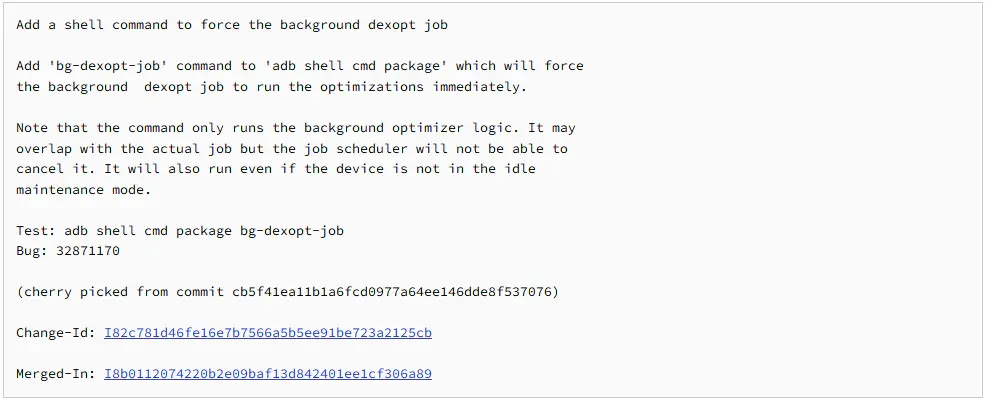
The cmd package bg-dexopt-job command is an official system maintenance service built into AOSP (AOSP GoogleSource Reference). By default, the system only runs this job when four strict criteria are met:
- The device is plugged into a charger.
- The battery has reached 100% capacity.
- The screen is off and the device is completely idle.
- No high-priority foreground applications are active.
Because these conditions are rarely satisfied concurrently during daytime use, apps accumulate uncompiled code. When you eventually plug your phone in, the device runs intensive background compilation, generating excessive heat and stressing battery longevity.
2. Technical Breakdown of Core Dexopt Commands
| Command Syntax | Compilation Mode | Recommended Purpose & Scope |
|---|---|---|
cmd package bg-dexopt-job |
Background Profile | Compiles all system and user apps based on recorded real-world usage patterns. |
pm compile -m speed -f [package] |
Speed AOT (Maximum) | Compiles complete machine code for a specific target app (ideal for heavy titles like Genshin or PUBG). |
pm compile -m speed-profile -a |
Speed Profile All | Applies system-wide profile-guided optimization to every installed application. |
cmd package compile --reset -a |
Factory Reset | Clears all custom compiled profiles and restores original factory compiler states. |
3. Key Advantages & Operational Notes
| Verified Benefits | Important Considerations |
|---|---|
| Noticeably faster app launch speeds (cuts cold startup latency by 30–50%). | The command utilizes high CPU resources for 3–8 minutes; minor device warming during execution is expected. |
| Prevents random thermal spikes and overnight battery drain while plugged in. | Internal storage footprint may increase by 50–150 MB to store AOT binary caches (completely normal). |
| Improves in-game frame pacing by reducing mid-session JIT compilation stutters. | Recommended to re-run once following any major Android OS (OTA) upgrade. |
4. Official Command Script Download
Android Dexopt System Optimizer
bg-dexopt-job-osteup.txtHigh-speed mirror download: MediaFire Mirror Link→
5. Step-by-Step Execution Guide
You can run this optimization directly on-device without a computer using Shizuku / Brevent / LADB, or via standard PC ADB cable connection.
-
Prepare the Execution Environment:
On mobile: Install Brevent, LADB, or grant shell privileges to Termux / OsteBoss via Shizuku.
On computer: Enable
Developer Options&USB Debuggingon your phone, then connect your USB cable to your PC with ADB installed. -
Execute Background Dexopt: Open your terminal window and run the following command:
cmd package bg-dexopt-job(On older Android 7 or 8 builds, you may use:pm bg-dexopt-job). -
Await Compilation: The terminal will hold the cursor for approximately 3 to 8 minutes depending on your installed app count. Once it returns
Successor outputs a fresh command prompt, optimization is complete. - Reboot Device: Restart your phone to allow the system to load the newly generated native bytecode cache.
6. Frequently Asked Questions (FAQ)
Does running Dexopt cause any data or account loss?
No, not at all. This command executes internal Android Runtime compilation, turning app bytecode into machine code. Personal data, photos, messages, and app states remain 100% untouched.
What if the terminal reports an error or fails to display "Success"?
Verify that your ADB shell privileges are active (omit the adb shell prefix if you are already inside an on-device shell like LADB or Brevent), and ensure your device runs Android 7.0 or newer.
How frequently should this optimization be executed?
Once is sufficient under ordinary use. You only need to run it again after major batch app installations, system OTA updates, or flashing a new custom ROM.
Related Articles

BrotX Optimizer v7: Rootless Android System Tuning via Shizuku ADB
Guide to rootless Android system tuning with BrotX Optimizer v7 via Shizuku ADB: enable ANGLE Vulkan GPU, 0ms floating window touch, 80% charge protection, and 58 flags.

iOS Debloat Script: Optimize Performance, Battery Life and Gaming FPS on Jailbroken iPhone
Complete guide to perf.sh iOS debloat script disabling 100+ telemetry and background daemons to reclaim RAM, eliminate thermal throttling, and boost gaming FPS.

OOptimize: Android 7-15 Gaming Tweaks (Root & No-Root)
Optimize SurfaceFlinger and GPU Vulkan pipeline on Android 7-15 with OOptimize: stabilize FPS, eliminate frame drops, and minimize touch input latency.

RAM Purger: Stop Background Processes & Boost Android Gaming Like iPhone
Complete guide to the rootless RAM Purger (frozen.sh) shell script terminating 400+ background app tasks to reclaim RAM and eliminate frame drops on Android.
Comments(4)
Sign in to join the conversation
Sign in with Google, Facebook or Email to leave a comment and get notified of replies.
bro tôi muốn tắt code thì tắt kiểu gì
FIX LAG QUÁ MÚP 10/10
Lỗi Không chạy được false