
DLS24 Lag Fix Tool v1: Universal Support for All Updates & Seasons

Key Takeaways
- Optimization Approach: Adjusts thread priority and CPU/GPU resource scheduling at the Android Runtime level for Dream League Soccer 2024 (
com.firsttouchgames.dls7). - Zero File Tampering: Operates entirely without touching files inside
Android/dataorobb, preserving full account safety. - Update Resilience: Remains effective across routine updates and new season transfers because settings bind to the core package identifier.
- Environment Requirements: Runs via Brevent or LADB (Android 11+ via Wireless Debugging) or local terminal emulators (Android 10 and older).
Dream League Soccer 2024 (DLS24) by First Touch Games remains one of the most accessible mobile football titles, combining tactical depth with responsive squad management. However, its upgraded 3D visual engine and physics simulations can strain budget and midrange hardware, showing up as sudden frame drops during set pieces, corner kicks, or crowded penalty box action. The DLS24 Lag Fix Tool v1 addresses these frame pacing issues by fine-tuning Android process scheduling parameters directly.
How the DLS24 Lag Fix Script Operates
Instead of editing graphic render files or replacing game assets, this shell script communicates with Android's system scheduler through ADB shell calls:
- CPU Affinity & Thread Prioritization: Elevates the main rendering threads of the game into the primary scheduling cgroup, reducing governor throttling during active gameplay.
- Background Process Dampening: Temporarily restrains non-essential background daemons from demanding CPU spikes while a DLS24 match is active.
- Frame Buffer Timing: Promotes consistent surface refresh cycles to minimize micro-stutter and frame tearing when players sprint on counterattacks.
Common Questions Regarding Safety and Compatibility
Will Using This Tool Result in an Account Ban?
No. Anti-cheat systems in First Touch Games titles flag file modifications inside game storage directories, memory manipulation, and modified APK binaries. This script touches none of those. It only communicates with the Android operating system to adjust resource allocation priorities, leaving game packages completely untouched.
Does the Fix Persist Across Game Updates and Seasons?
Yes. The script references the official package identifier com.firsttouchgames.dls7. As long as the studio retains this package signature, your optimization commands remain applicable across minor patches, roster updates, and new tournament releases.
Download DLS24 Lag Fix Package v1
ZIP archive containing the performance optimization script and default restore script
osteup
Step-by-Step Installation and Execution Guide
Step 1: Prepare an Execution Application
Android enforces permission barriers around shell commands. Choose an application suited for your system version to run the script:
| Android Version | Recommended App | Activation Method | Reliability |
|---|---|---|---|
| Android 11, 12, 13, 14+ | Brevent, LADB, Shizuku | Wireless Debugging pairing directly on device | 100% (Recommended) |
| Android 10 and older | Ostebox, Qute, Termux | One-time PC ADB pairing or local terminal | Device-dependent |
Step 2: Extract Archive to the Correct Storage Path
After downloading DLS2024_v1.zip, extract its contents using ZArchiver, Files, or MT Manager. Ensure the extracted folder is placed exactly at:
/storage/emulated/0/Download/DLS2024_v1/The extracted DLS2024_v1 folder includes two shell scripts:
FixLagDLS_v1_osteup.sh: Applies performance tuning and scheduling priority.RestoreFixLagDLS_v1_osteup.sh: Restores default Android system properties.
Step 3: Execute the Optimization Script
Open Brevent (or your chosen terminal). Navigate to the Exec Command section in the menu.
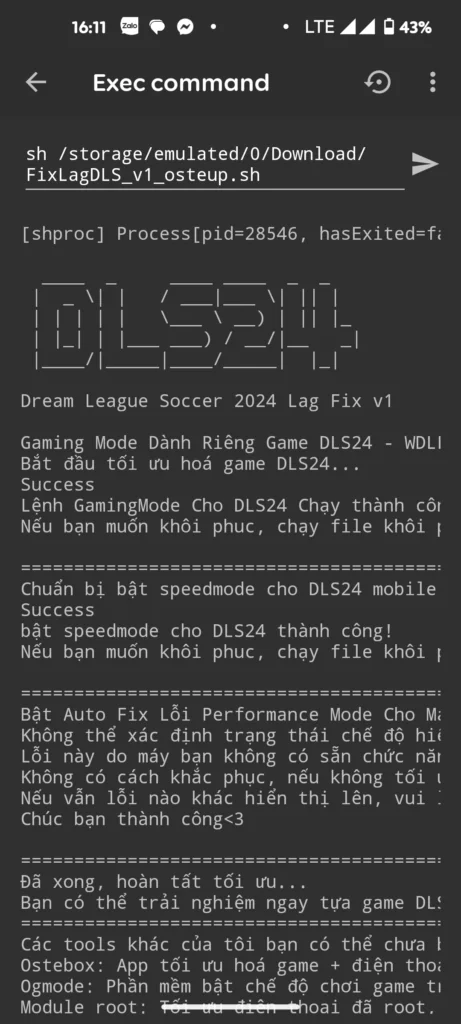
Paste the following command line and press run:
sh /storage/emulated/0/Download/DLS2024_v1/FixLagDLS_v1_osteup.shWait for the terminal to print the completion output with an exit code of 0. Once finished, the new scheduling values are active.
Step 4: Reverting Changes Back to Default
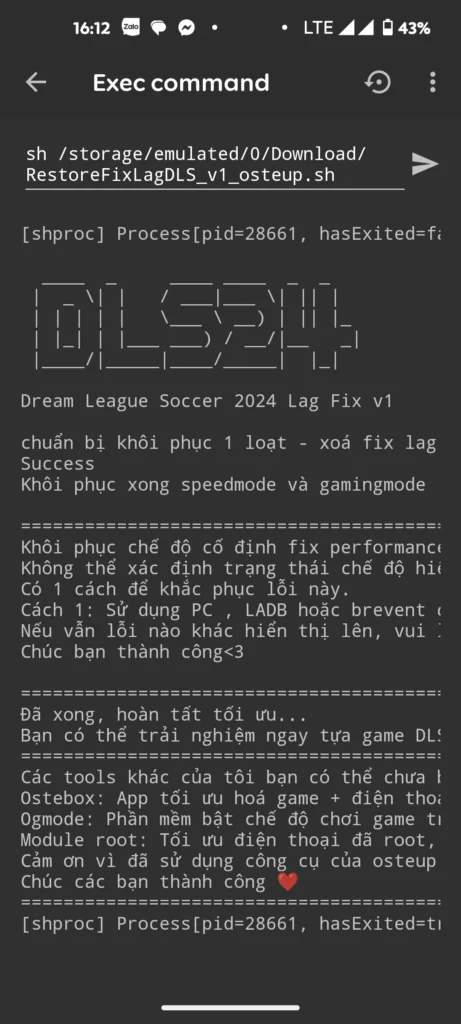
If you ever want to revert all system parameters to their original state, run the restoration script:
sh /storage/emulated/0/Download/DLS2024_v1/RestoreFixLagDLS_v1_osteup.shTroubleshooting "No Such File Or Directory" Errors
If the terminal prints No such file or directory, Android's Linux filesystem case sensitivity is usually the reason:
- Check folder casing: On some original equipment manufacturer (OEM) skins, the download path is named
download(lowercase d) instead ofDownload. Adjust your command tosh /storage/emulated/0/download/DLS2024_v1/FixLagDLS_v1_osteup.shor rename the directory in your file manager. - Avoid nested folders: Confirm that the script files sit directly inside
Download/DLS2024_v1/rather than an accidental subfolder likeDownload/DLS2024_v1/DLS2024_v1/.
Frequently Asked Questions (FAQ)
Do I need to re-run the script after rebooting my phone?
Because ADB-level modifications do not alter system partition read-only blocks, Android may restore some scheduler defaults upon a complete device reboot. If you notice stutter returning after restarting your phone, open Brevent and re-run the command.
Does this increase battery drain or thermal output?
By preventing aggressive governor drops, the device holds steady frequencies during matches, which can lead to a slight, normal warming on older chipsets. Once you exit the game, standard thermal and power profiles take over automatically.
Can this tool be used for DLS 2023 or older releases?
This package is built specifically for Dream League Soccer 2024 with the package identity com.firsttouchgames.dls7. For previous releases, refer to the corresponding guides on Osteup for tailored package parameters.
Launch Dream League Soccer 2024 and jump into a match to verify the frame pacing improvement. If you run into unexpected behavior, leave a comment or visit our community channels for troubleshooting assistance.
Related Articles

BrotX Optimizer v7: Rootless Android System Tuning via Shizuku ADB
Guide to rootless Android system tuning with BrotX Optimizer v7 via Shizuku ADB: enable ANGLE Vulkan GPU, 0ms floating window touch, 80% charge protection, and 58 flags.

iOS Debloat Script: Optimize Performance, Battery Life and Gaming FPS on Jailbroken iPhone
Complete guide to perf.sh iOS debloat script disabling 100+ telemetry and background daemons to reclaim RAM, eliminate thermal throttling, and boost gaming FPS.

OOptimize: Android 7-15 Gaming Tweaks (Root & No-Root)
Optimize SurfaceFlinger and GPU Vulkan pipeline on Android 7-15 with OOptimize: stabilize FPS, eliminate frame drops, and minimize touch input latency.

RAM Purger: Stop Background Processes & Boost Android Gaming Like iPhone
Complete guide to the rootless RAM Purger (frozen.sh) shell script terminating 400+ background app tasks to reclaim RAM and eliminate frame drops on Android.
Comments(2)
Sign in to join the conversation
Sign in with Google, Facebook or Email to leave a comment and get notified of replies.
Halo