
Free Fire Lag Fix Tool v2: Universal Support for All Updates & Seasons

Key Takeaways
- Version 2 Enhancements: Introduces direct thread prioritization and CPU governor tuning tailored to the standard Free Fire package (
com.dts.freefireth), improving touch responsiveness and reducing frame pacing stutters during congested firefights. - Zero File Alterations: Runs exclusively at the Android Runtime scheduler level without modifying files inside
Android/dataorobb, ensuring 100% account security. - Long-Term Compatibility: Remains operational across routine OB patches and season rollouts due to persistent package signature binding.
- Environment Requirements: Executed through Brevent or LADB (Android 11+ via Wireless Debugging) or local terminal emulators (Android 10 and older).
Following up on the initial release, the Free Fire Lag Fix Tool v2 is built to deliver smoother frame delivery in Garena Free Fire on budget and midrange Android devices. During intense squad encounters, shrinking safe zones, and complex character skill animations, aggressive thermal throttling often causes sudden frame dips and sluggish aim tracking. This v2 update targets the operating system's process dispatcher to help maintain a stable, uniform frame rate.

What Is New in Free Fire Lag Fix Tool v2
Compared to the first iteration, version 2 brings several critical improvements:
- Direct Package Resource Prioritization: The system identifies the active
com.dts.freefirethprocess and promotes its rendering threads to top-tier scheduling cgroups, preventing competing background processes from stealing CPU cycles. - Refined Touch Input Latency: Reduces input sampling delays at the display driver layer, allowing for snappier crosshair drag and quicker reaction times.
- Intelligent Thermal Governor Pacing: Adjusts clock governor frequencies to prevent abrupt downclocking spikes without causing excessive battery heat buildup.
Frequently Asked Questions About Version 2
How Does Version 2 Differ from Version 1?
While version 1 focused on broad background task dampening across the operating system, version 2 applies targeted parameters directly linked to the Free Fire game runtime, while also adding a cleaner restoration script for easy rollback.
Can Using This Script Cause an Account Ban?
No. Game security mechanisms detect modified APKs, altered game data in storage, or memory injection cheats. This shell script touches none of those. It only adjusts Android operating system process scheduling parameters via ADB, leaving game files untouched.
Download Free Fire Lag Fix Package v2
ZIP archive containing performance tuning scripts and the default restore script
osteup
Step-by-Step Installation and Execution Guide
Step 1: Set Up an Execution Tool
Android requires shell-level permissions to execute command scripts. Pick an application compatible with your phone's Android version:
| Android Version | Recommended App | Activation Method | Reliability |
|---|---|---|---|
| Android 11, 12, 13, 14+ | Brevent, LADB, Shizuku | Wireless Debugging pairing directly on device | 100% (Recommended) |
| Android 10 and older | Ostebox, Qute, Termux | One-time PC ADB pairing or local terminal | Device-dependent |
Step 2: Extract Archive to the Storage Directory
After downloading FixLagFF_v2_Osteup.zip, extract the archive using ZArchiver, Files, or MT Manager. Ensure the extracted folder sits at this exact location:
/storage/emulated/0/Download/FixLagFF_v2_Osteup/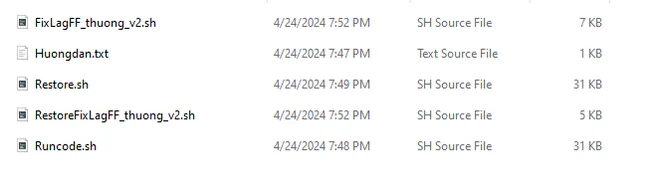
Step 3: Run the Optimization Script
Open Brevent (or your chosen terminal). Go to the Exec Command window and enter the following command:
sh /storage/emulated/0/Download/FixLagFF_v2_Osteup/Runcode.shTap Enter or the Play icon to run. The terminal will process the instructions and output an exit code of 0 once completed.
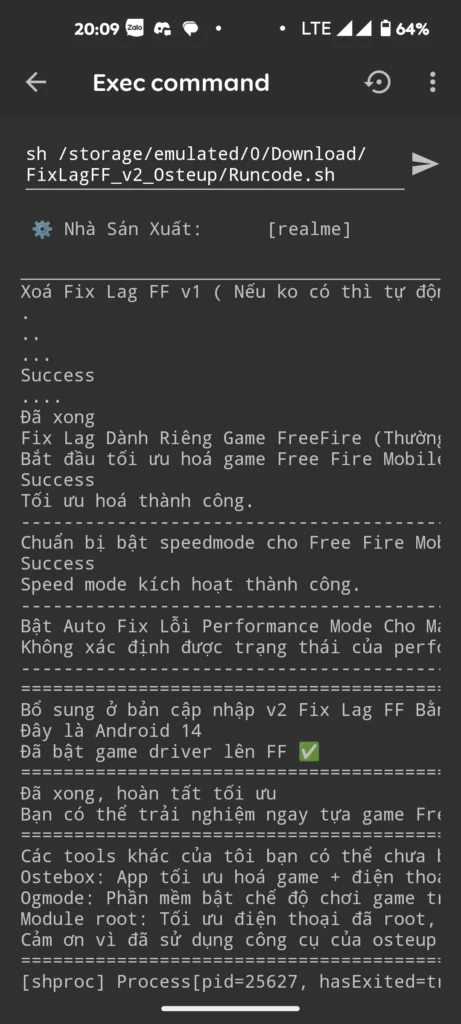
Step 4: Reverting Changes Back to Default
To undo all modifications and return your phone's system parameters to factory defaults, simply run the restoration script:
sh /storage/emulated/0/Download/FixLagFF_v2_Osteup/Restore.shTroubleshooting "No Such File Or Directory" Errors
If the terminal returns a No such file or directory error, verify these two common filesystem issues:
- Check folder letter casing: Linux-based Android filesystems are case-sensitive. If your storage folder is named
download(lowercase), change the command tosh /storage/emulated/0/download/FixLagFF_v2_Osteup/Runcode.shor rename the directory toDownload. - Avoid nested folders: Confirm that
Runcode.shresides directly withinDownload/FixLagFF_v2_Osteup/rather than an accidental nested directory likeDownload/FixLagFF_v2_Osteup/FixLagFF_v2_Osteup/.
Frequently Asked Questions (FAQ)
Can this v2 tool be used with Free Fire MAX?
This script is configured specifically for the standard Free Fire package (com.dts.freefireth). If you play Free Fire MAX (com.dts.freefiremax), please refer to our dedicated Free Fire MAX guide on Osteup for tailored optimization parameters.
Do I need to re-run the script after restarting my phone?
Because non-root ADB commands do not modify protected read-only system partitions, Android may reset certain scheduler parameters on a full reboot. If you notice stutter returning after restarting your device, simply open Brevent and re-run the command.
Does this cause higher battery consumption?
Battery usage may increase marginally during matches because the CPU clock is maintained at a steady rate to eliminate sudden FPS drops. Once the game is closed, standard power management resumes immediately.
Hop into a ranked match in Free Fire to test the improved frame pacing and touch precision. If you encounter any issues, feel free to leave feedback for support.
Related Articles

BrotX Optimizer v7: Rootless Android System Tuning via Shizuku ADB
Guide to rootless Android system tuning with BrotX Optimizer v7 via Shizuku ADB: enable ANGLE Vulkan GPU, 0ms floating window touch, 80% charge protection, and 58 flags.

iOS Debloat Script: Optimize Performance, Battery Life and Gaming FPS on Jailbroken iPhone
Complete guide to perf.sh iOS debloat script disabling 100+ telemetry and background daemons to reclaim RAM, eliminate thermal throttling, and boost gaming FPS.

OOptimize: Android 7-15 Gaming Tweaks (Root & No-Root)
Optimize SurfaceFlinger and GPU Vulkan pipeline on Android 7-15 with OOptimize: stabilize FPS, eliminate frame drops, and minimize touch input latency.

RAM Purger: Stop Background Processes & Boost Android Gaming Like iPhone
Complete guide to the rootless RAM Purger (frozen.sh) shell script terminating 400+ background app tasks to reclaim RAM and eliminate frame drops on Android.
Comments(2)
Sign in to join the conversation
Sign in with Google, Facebook or Email to leave a comment and get notified of replies.
Feedback lại cho team là chạy xong lag hơn cũ nha cần chỉnh lại nhiều không thấy khả qua