
Free Fire MAX Lag Fix Tool v1: Universal Support for All Updates & Seasons

Key Takeaways
- Runtime Optimization: Dynamically adjusts process scheduling priorities and CPU/GPU resource allocation for the Free Fire MAX package (
com.dts.freefiremax). - Account Safe: Operates entirely at the Android OS layer without modifying game files (OBB/data), adhering strictly to Garena's anti-cheat terms.
- Future-Proof: Works reliably across upcoming patches and seasonal updates since it references persistent system package identifiers.
- Prerequisites: Runs via ADB process management tools like Brevent, LADB, or Shizuku on Android 11+, or via local terminal tools on Android 10 and older.
Free Fire MAX brings Ultra HD graphical textures, advanced lighting calculations, and immersive spatial audio over the original version. However, these enhancements impose significant demands on hardware, leading to noticeable frame drops, thermal throttling, and stutter on budget or older Android smartphones. The Free Fire MAX Lag Fix Tool v1 addresses these performance bottlenecks at the Android runtime layer without tampering with internal game files.

How the Free Fire MAX Performance Script Works
Unlike configuration patches or game data mods that alter internal graphics settings, this shell script interacts directly with Android's system framework:
- Elevated Foreground Priority: Assigns higher scheduling priority to the game process while active, preventing unexpected CPU throttling by the kernel scheduler.
- Background Resource Regulation: Temporarily throttles non-essential background tasks during gaming sessions, freeing up RAM and compute cycles.
- Rendering Buffer Optimization: Stabilizes graphics buffer parameters to reduce frame pacing jitter and latency spikes during intensive combat scenes.
Frequently Addressed Questions on Safety and Compatibility
Will Using This Script Result in an Account Ban?
No. Garena's anti-cheat systems scan for unauthorized client modifications, injected memory hooks, and altered directories inside Android/data/com.dts.freefiremax. This shell script executes standard Android management commands via ADB. Because it leaves the APK package and data directories completely untouched, account security remains fully preserved.
Does It Remain Effective After Game Updates?
Yes. The script targets the persistent Android application package identifier com.dts.freefiremax. As long as Garena retains this package name, the optimization instructions continue functioning seamlessly through major season rollouts, map updates, and UI revamps.
Download Free Fire MAX Lag Fix Package v1
ZIP archive containing the performance optimization script and default restore script
osteup
Step-by-Step Installation and Execution Guide
Step 1: Set Up an Execution Environment
Android restricts script execution permissions. You will need a suitable tool to feed the shell command into the operating system based on your device's Android version:
| Android OS Version | Recommended Application | Permission Setup Method | Execution Reliability |
|---|---|---|---|
| Android 11, 12, 13, 14+ | Brevent, LADB, Shizuku | Wireless Debugging pairing directly on device without a PC | 100% (Recommended) |
| Android 10 and Older | Ostebox, Qute, Termux | One-time ADB authorization via PC or local terminal shell | Varies by OEM ROM |
Step 2: Extract and Verify File Path
Once FFMAX_v1.zip has finished downloading, use an archive manager like ZArchiver, Files, or MT Manager to extract it. Confirm that the extracted directory matches the following storage path exactly:
/storage/emulated/0/Download/FFMAX_v1/Inside the FFMAX_v1 folder, you will find two files:
FixLagFFmax_v1_osteup.sh: The active script that engages the gaming optimizations.RestoreFixLagFFmax_v1_osteup.sh.sh: The recovery script to revert back to stock settings.
Step 3: Run the Optimization Script
Launch Brevent (or your chosen execution app). Open the left drawer menu and select Exec Command.
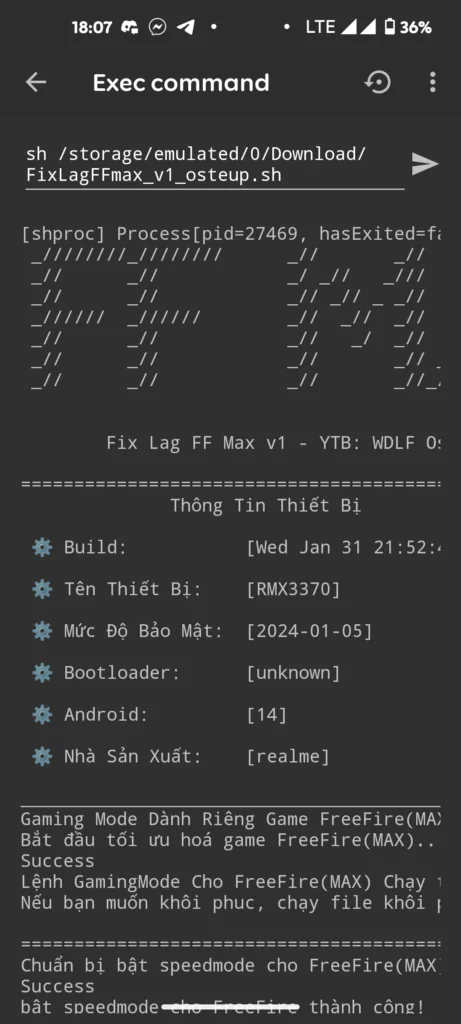
Input the following command string precisely and tap run:
sh /storage/emulated/0/Download/FFMAX_v1/FixLagFFmax_v1_osteup.sh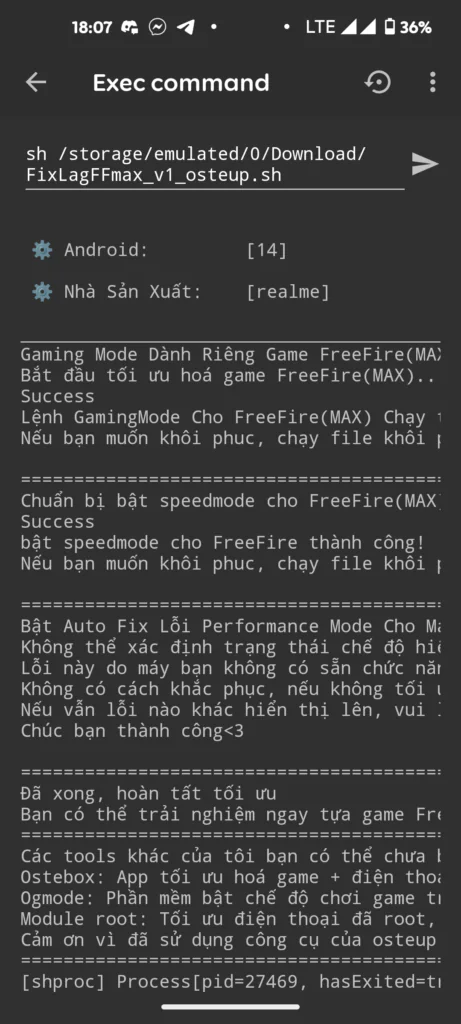
The terminal will display configuration outputs reflecting the newly applied process parameters:
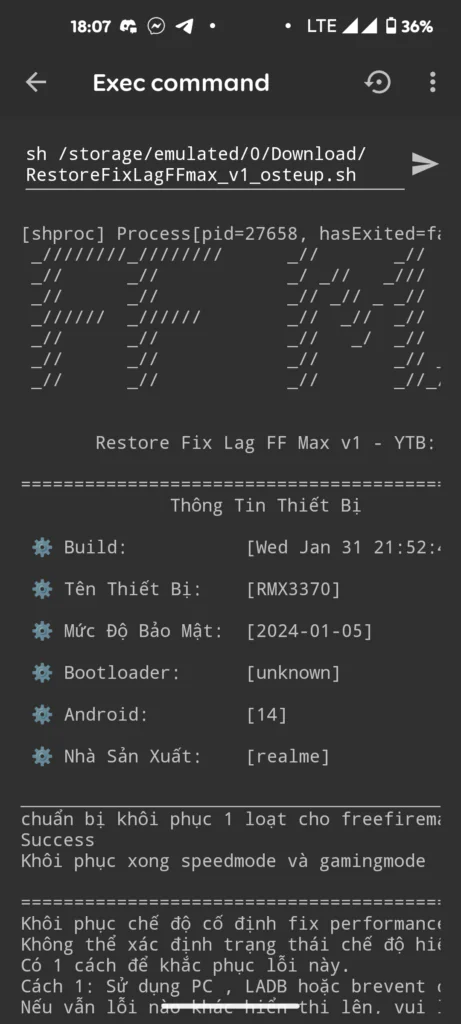
When the window outputs a success confirmation with an exit code of 0, the optimizations are fully engaged across your system.
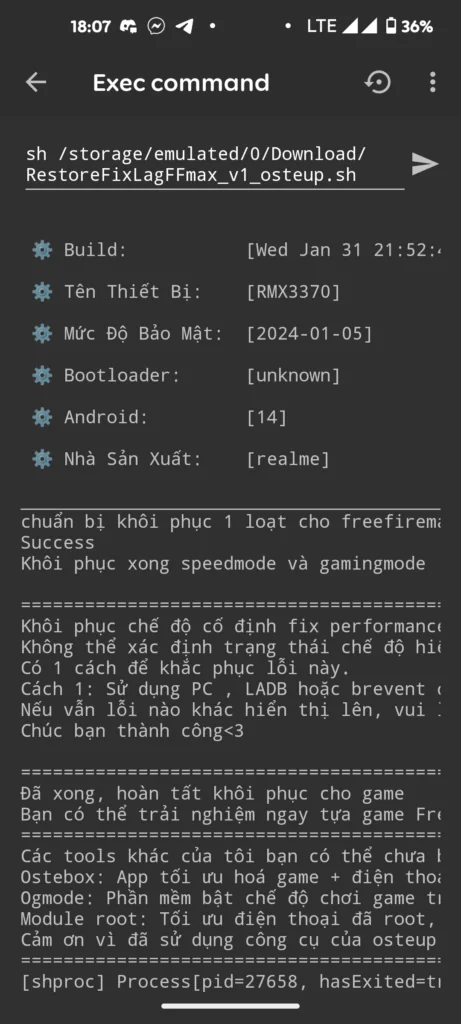
Step 4: Reverting to Stock Configuration
If you ever wish to remove these tweaks and restore your device's original baseline parameters, simply execute the restoration script:
sh /storage/emulated/0/Download/FFMAX_v1/RestoreFixLagFFmax_v1_osteup.sh.shTroubleshooting "No Such File Or Directory" Errors
If you encounter a No such file or directory error, the issue is almost always path case sensitivity in the underlying Linux filesystem:
- Download Folder Casing: Some custom OEM skins label internal storage paths with lowercase
downloadrather than capitalizedDownload. If the script fails to locate the file, adjust the command tosh /storage/emulated/0/download/FFMAX_v1/.... - Nested Folder Extraction: Verify that the files were extracted directly into
Download/FFMAX_v1/rather than a double-nested directory such asDownload/FFMAX_v1/FFMAX_v1/.
Frequently Asked Questions
Do the tweaks persist after rebooting the phone?
Because these commands operate through userland ADB permissions without persistent root modifications, Android resets certain runtime values upon a full reboot. If you notice lower frame rates after restarting your phone, simply re-run the Brevent command in a few seconds.
Will this increase battery consumption or operating temperatures?
During active gameplay, the script maintains consistent core clock speeds to prevent stutter, which can lead to slightly higher device temperatures compared to aggressive thermal throttling. Once you exit the game, power management returns to standard Android profile levels.
Can this script be used for the standard version of Free Fire?
Version 1 of this tool specifically targets the Free Fire MAX package identifier (com.dts.freefiremax). For the standard edition (com.dts.freefireth), refer to our dedicated guide for standard Free Fire on Osteup.
Once completed, launch Free Fire MAX and test your framerate stability in combat. Feel free to leave a comment if you run into any setup obstacles.
Related Articles

BrotX Optimizer v7: Rootless Android System Tuning via Shizuku ADB
Guide to rootless Android system tuning with BrotX Optimizer v7 via Shizuku ADB: enable ANGLE Vulkan GPU, 0ms floating window touch, 80% charge protection, and 58 flags.

iOS Debloat Script: Optimize Performance, Battery Life and Gaming FPS on Jailbroken iPhone
Complete guide to perf.sh iOS debloat script disabling 100+ telemetry and background daemons to reclaim RAM, eliminate thermal throttling, and boost gaming FPS.

OOptimize: Android 7-15 Gaming Tweaks (Root & No-Root)
Optimize SurfaceFlinger and GPU Vulkan pipeline on Android 7-15 with OOptimize: stabilize FPS, eliminate frame drops, and minimize touch input latency.

RAM Purger: Stop Background Processes & Boost Android Gaming Like iPhone
Complete guide to the rootless RAM Purger (frozen.sh) shell script terminating 400+ background app tasks to reclaim RAM and eliminate frame drops on Android.
Comments(4)
Sign in to join the conversation
Sign in with Google, Facebook or Email to leave a comment and get notified of replies.
Hey yo dude, why did I run the code SUCCESSFULLY but when I enter the game I see it's still the same?, yes, it's still laggy and still annoys ME, it actually leaves the line of code as [success]
Túi chạy code nó không hiện tên thiết bị hay cái gì hết nó bị ẩn hết túi hỏi là có sao không