
OPSM Tool: Save Android Battery Without Sacrificing Performance (No Root)

Standard Android battery saver modes operate by aggressively underclocking the CPU, forcing refresh rates down to 60Hz, and throttling system animations. This causes noticeable stutter during daily scrolling and severe frame drops while gaming. The OPSM Tool (Osteup PowerSaver Mode) takes a fundamentally different engineering approach: identifying and suspending background bloatware, telemetry, and OEM background services while preserving 100% of your processor and GPU performance.
1. What Is the OPSM Tool and How Does It Work?
OPSM stands for Osteup PowerSaver Mode. Unlike traditional overclocking tools (such as OGMM) that maximize raw clock speeds at the expense of power, OPSM specifically optimizes standby power draw without limiting hardware performance:
- Background package scanning: The script checks installed packages against a curated database of OEM bloatware (Samsung, Xiaomi, Huawei, OPPO, Realme) and carrier telemetry services.
- Targeted standby restriction: Applies Android App Standby Bucket policies and background execution limits directly to redundant services, preventing them from waking the CPU during screen-off states.
- Zero impact on active tasks: The core operating system, foreground UI rendering threads, and active gaming workloads retain unrestricted hardware access.
| Evaluation Metric | Default Android Battery Saver | OPSM PowerSaver Mode |
|---|---|---|
| CPU & GPU Frequencies | Throttled down to 70% capacity | Operates at 100% full hardware potential |
| Display Refresh Rate | Forced down to 60Hz | Maintains smooth 90Hz / 120Hz / 144Hz |
| Background Bloatware Control | Generic process suspension | Enforces strict standby buckets on idle telemetry |
| Gaming Experience | Unstable frame pacing and FPS drops | Fluid gameplay, lower thermal generation |
2. Targeted Background Services and Bloatware Packages
OPSM addresses over 50 persistent background services that drain battery reserves silently across major Android custom skins:
| Manufacturer / Category | Suspended Background Services |
|---|---|
| Samsung One UI | Bixby Agent, Game Home, Samsung Weather, Email Provider, Kids Installer |
| Xiaomi HyperOS / MIUI | Xiaomi Hybrid, Bug Report, Global BBS, Mi Drop |
| Huawei / Honor | Huawei HWID, HiCloud, HwMirror |
| OPPO & Realme | ColorOS Backup Restore, Oppo Power Monitor, SAU Helper, Realme Community, Smart Drive |
| Carrier & Social Telemetry | Facebook Telemetry, Instagram Background Sync, Twitter, Snapchat, Reddit, LinkedIn, Viettel, TrueMove, Telkomsel, AIS |
| Redundant System Daemons | Print Spooler (wireless printing), Exchange Services, Sound Recorder analytics |
If your smartphone does not have specific packages from this list installed, the script safely skips them without throwing errors or interrupting execution.
3. Checking Device Compatibility
The OPSM script includes built-in verification to detect whether your execution environment possesses adequate shell permissions:
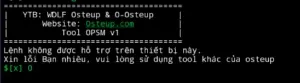
Standard terminal applications like Qute or Termux will fail without elevated ADB or Shizuku permissions. For guaranteed compatibility, use:
- Brevent or LADB: Recommended for Android 11 and newer via local Wireless Debugging.
- Computer ADB Shell: 100% compatible across all Android OS versions.
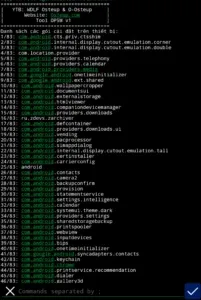
4. Download OPSM Battery Saver Tool
Download the verified script package below, which includes the activation script (OPSM.sh) and the factory restore script (RestoreOPSM.sh):
5. Step-by-Step Execution Guide
Step 1: Extract the script files
- Download
OPSM_Tool_PowerSaver_Mode.zipto your Android device. - Extract the zip archive with an archive manager (e.g., ZArchiver) using password
osteup. - Ensure both
OPSM.shandRestoreOPSM.share placed directly in your internal storage Download folder (path:/storage/emulated/0/Download/).
Step 2: Open your terminal environment
Launch Brevent, LADB, or an established PC ADB shell session connected to your phone.
Step 3: Execute the optimization command
Enter the following command into your terminal prompt and press Enter:
sh /storage/emulated/0/Download/OPSM.shThe script will process each rule within seconds. You only need to run this command once; your optimized power management settings will persist across device restarts.
sh /storage/emulated/0/Download/RestoreOPSM.sh6. Frequently Asked Questions (FAQ)
Will this script delay notifications from WhatsApp, Telegram, or Gmail?
No. OPSM selectively targets unnecessary OEM bloatware and background analytics. Primary communication services and messaging platforms remain unrestricted, ensuring instant push notifications.
Do I need to re-run the script every time my phone restarts?
No. Android saves app standby configurations in its internal package settings database, meaning your optimization stays active through standard reboot cycles.
Does this require root access or an unlocked bootloader?
No root access is required. The script executes entirely through standard Android Debug Bridge (ADB) user-space permissions without tampering with boot partitions or voiding your device warranty.
Related Articles

BrotX Optimizer v7: Rootless Android System Tuning via Shizuku ADB
Guide to rootless Android system tuning with BrotX Optimizer v7 via Shizuku ADB: enable ANGLE Vulkan GPU, 0ms floating window touch, 80% charge protection, and 58 flags.

iOS Debloat Script: Optimize Performance, Battery Life and Gaming FPS on Jailbroken iPhone
Complete guide to perf.sh iOS debloat script disabling 100+ telemetry and background daemons to reclaim RAM, eliminate thermal throttling, and boost gaming FPS.

OOptimize: Android 7-15 Gaming Tweaks (Root & No-Root)
Optimize SurfaceFlinger and GPU Vulkan pipeline on Android 7-15 with OOptimize: stabilize FPS, eliminate frame drops, and minimize touch input latency.

RAM Purger: Stop Background Processes & Boost Android Gaming Like iPhone
Complete guide to the rootless RAM Purger (frozen.sh) shell script terminating 400+ background app tasks to reclaim RAM and eliminate frame drops on Android.
Comments(0)
Sign in to join the conversation
Sign in with Google, Facebook or Email to leave a comment and get notified of replies.
No comments yet. Be the first to join the conversation!