
Overclock & Boost Android CPU Performance Up to 50% (No Root)

Smartphone manufacturers deliberately program Android CPU scaling governors with conservative thresholds to prioritize all-day battery life and minimize device thermals. Under sustained gaming or intensive workloads, aggressive thermal throttling kicks in, parking high-performance cores and dropping clock speeds, which leads to sudden FPS dips and UI sluggishness. This shell optimization script loosens software frequency governors, unlocks sustained performance cluster scaling, and delivers up to a 50% responsiveness boost across both non-rooted and rooted Android smartphones.
1. How Does Non-Root Android CPU Boosting Work?
On unrooted devices with locked bootloaders, hardware-level overclocking (raising physical clock multiplier limits or increasing core voltages) is impossible. However, using Android's standard Debug Bridge (ADB) permissions, we can recalibrate the OS-level software scaling governor parameters:
- Elevated Minimum Frequency Floor: Raises the idle frequency baseline for big CPU clusters, preventing the operating system from downclocking to low energy-saving states during active frame rendering.
- Instant Touch Boost Scaling: Forces the scaling governor to jump directly to peak clock speeds the instant a touch gesture is detected, eliminating input drag and animation delays.
- Optimized Task Scheduler Hysteresis: Modifies the
schedutilgovernor parameters to prioritize demanding foreground tasks on high-performance performance cores rather than prematurely shifting loads to power-saving LITTLE cores.
| Evaluation Parameter | Stock Android System | After CPU Boost Enabled |
|---|---|---|
| Big Core Cluster Frequency | Throttled down after 5-10 minutes of use | Maintains high sustained clock frequencies |
| Touch Response Latency | Delayed while waiting for CPU ramp-up | Instantaneous scaling upon screen contact |
| Frame Rate Stability (Gaming) | Prone to micro-stutter in heavy combat | Flat, smooth frame delivery with minimal drops |
| Power Consumption | Conservative battery conservation mode | Higher battery drain during heavy 3D gaming |
2. Key Advantages & Usage Trade-offs
| Key Advantages | Trade-offs & Considerations |
|---|---|
| Substantial CPU speedup for both non-rooted and rooted phones | Battery discharges faster during gaming or benchmark runs |
| Significantly reduces frame drops in demanding 3D titles | The phone's back panel will feel warmer during extended use |
| Takes effect immediately without requiring a reboot | Recommended to game in a cool environment or with a cooling fan |
| Includes an instant 100% factory restore script | Does not void warranty or alter protected system partitions |
3. Download Android CPU Boost Script
Download the verified script package below, containing the activation script (BoostCPU.sh) and the factory restore script (RestoreCPU.sh):
4. Step-by-Step Installation Instructions
Step 1: Extract the script files
- Download
Boost_CPU_50_Android.zipto your Android device. - Extract the zip archive with an archive manager (such as ZArchiver) using the password
osteup. - Ensure both
BoostCPU.shandRestoreCPU.share located directly in your internal storage Download folder (path:/storage/emulated/0/Download/).
Step 2: Open your terminal environment
Launch Brevent, LADB (for Android 11+ via Wireless Debugging), or connect your phone to a computer and launch an ADB shell session.
Step 3: Run the CPU boost command
Copy and paste the command below into your terminal prompt and press Enter:
sh /storage/emulated/0/Download/BoostCPU.sh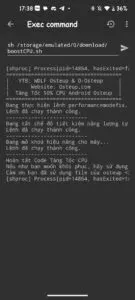
The parameters take effect immediately across all CPU clusters without needing a device reboot. You can open a demanding game immediately to experience the smoother frame rate and faster touch response.
sh /storage/emulated/0/Download/RestoreCPU.sh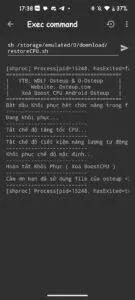
5. Frequently Asked Questions (FAQ)
Can this software overclocking damage my processor or overheat my phone?
No. The script only tunes the operating system's software scaling within the maximum safe clock limits engineered by Qualcomm or MediaTek. Built-in kernel thermal emergency cutoffs remain active and protected.
Do I have to re-run the command after rebooting my phone?
Yes. Because these parameters are configured in user-space memory via ADB without modifying read-only system partitions, a complete phone reboot will reset them to stock. Simply run the command once after each reboot.
Is there a noticeable improvement on budget chips (Snapdragon 680, Helio G85)?
Yes, significantly. Budget and mid-tier processors are often heavily restricted by conservative OEM governors to preserve battery. Removing these artificial software bottlenecks unlocks much smoother app switching and reduces gaming frame drops.
Related Articles

BrotX Optimizer v7: Rootless Android System Tuning via Shizuku ADB
Guide to rootless Android system tuning with BrotX Optimizer v7 via Shizuku ADB: enable ANGLE Vulkan GPU, 0ms floating window touch, 80% charge protection, and 58 flags.

iOS Debloat Script: Optimize Performance, Battery Life and Gaming FPS on Jailbroken iPhone
Complete guide to perf.sh iOS debloat script disabling 100+ telemetry and background daemons to reclaim RAM, eliminate thermal throttling, and boost gaming FPS.

OOptimize: Android 7-15 Gaming Tweaks (Root & No-Root)
Optimize SurfaceFlinger and GPU Vulkan pipeline on Android 7-15 with OOptimize: stabilize FPS, eliminate frame drops, and minimize touch input latency.

RAM Purger: Stop Background Processes & Boost Android Gaming Like iPhone
Complete guide to the rootless RAM Purger (frozen.sh) shell script terminating 400+ background app tasks to reclaim RAM and eliminate frame drops on Android.
Comments(1)
Sign in to join the conversation
Sign in with Google, Facebook or Email to leave a comment and get notified of replies.
Tang toc game