
[ROOT] Magisk Module to Disable Unnecessary Background Services on Android
![[ROOT] Module Magisk Tắt Bớt Dịch Vụ Không Cần Thiết Android](/_next/image?url=%2Fapi%2Fmedia%2Ffile%2Froot-module-magisk-tat-bot-dich-vu-khong-can-thiet-androids.webp%3F2026-10-19T05%253A03%253A54.729Z&w=3840&q=100)
On Android devices, the Linux Kernel and Android framework services continuously run background routines to generate debug logs (logcat), monitor scheduler statistics (schedstats), and process diagnostic traces. While these instrumentation systems are invaluable to software engineers during development, they generate continuous I/O overhead and redundant CPU interrupts on consumer devices. This background churn causes persistent battery drain during standby, elevates device temperatures, and degrades gaming smoothness. The Magisk Module to Disable Unnecessary Background Services is a clean, systemless solution designed for rooted Android phones to suppress non-essential logging and tracing without altering core system partitions.
- Primary Focus: Selectively disables Android background logging, logcat buffering, kernel printk output, and developer tracing hooks.
- Mandatory Requirements: Root access enabled via Magisk (v23.0+), KernelSU, or APatch with an unlocked bootloader.
- Performance Gains: Reduces continuous flash storage read/write cycles (I/O burden), curtails idle battery drain, and helps the CPU enter Deep Sleep faster.
- High Compatibility: Operates systemless via standard sysfs/prop injection without conflicting with audio mods, UI overlays, or game booster modules.
1. Technical Scope: Which Background Services Are Disabled?
The module executes at the boot stage, writing optimized parameters to Linux kernel interfaces and runtime service nodes to suppress resource-heavy background telemetry:
- Android Logging & Logcat: Halts continuous writing of third-party application debug messages to memory buffers, reclaiming RAM and processor bandwidth.
- Tracing & Systrace Hooks: Deactivates performance profiling probes that are only needed when profiling app rendering latencies in Android Studio.
- Kernel Printk Buffering: Suppresses low-level kernel diagnostic chatter directed toward
/dev/kmsg, allowing processor cores to settle into Deep Sleep states without frequent wakeups. - Scheduler Statistics (sched_schedstats): Disables granular scheduling analytics, saving thousands of micro-calculations on every CPU thread context switch.
- Crash Dump Reporting: Prevents automatic disk dumps and tombstone file creation from minor background application faults.
2. Performance & Functionality Trade-Off Analysis
Understanding the technical differences before and after flashing ensures you know exactly how the operating system responds:
| System Subsystem | Default OS State | After Module Flashing | Practical User Impact |
|---|---|---|---|
| Logcat Memory Buffer | Continuously writes logs from all active apps and system services. | Background log streaming suspended; only critical errors captured. | Lowers flash storage wear and reduces standby battery drain. |
| Kernel Printk Stream | Pushes full kernel diagnostic streams to kmsg buffer. | Mutes non-essential runtime printk logging calls. | Allows CPU to transition into Deep Sleep states smoothly. |
| App Debugging Capability | Developers can inspect ADB logcat streams in real time. | Diagnostic logs are suppressed when applications crash. | Zero impact on normal users; temporary hindrance for app developers. |
| Module Coexistence | Not applicable. | Does not modify framework binaries or visual resources. | 100% compatible with gaming modules, ViPER4Android, and custom fonts. |
3. Step-by-Step Installation Guide via Magisk / KernelSU
Ensure your device has adequate battery charge and that you have installed Magisk v23.0 or newer before proceeding:
-
Download the Module Package: Download
[Magisk] UNNCESSARY WASTE Processes Dissabler.zipfrom the download card below to your phone's internal storage. - Open Your Root Manager: Launch the Magisk app (or KernelSU / APatch) from your app drawer.
- Navigate to the Modules Section: Tap on the Modules tab (puzzle piece icon in the bottom-right navigation bar) and tap Install from storage.
-
Select the Zip Archive: Browse to your Download directory and select
[Magisk] UNNCESSARY WASTE Processes Dissabler.zip. - Reboot the Device: The flashing script will execute in 2–3 seconds. Once the terminal displays Done!, tap the Reboot button to apply all optimizations.
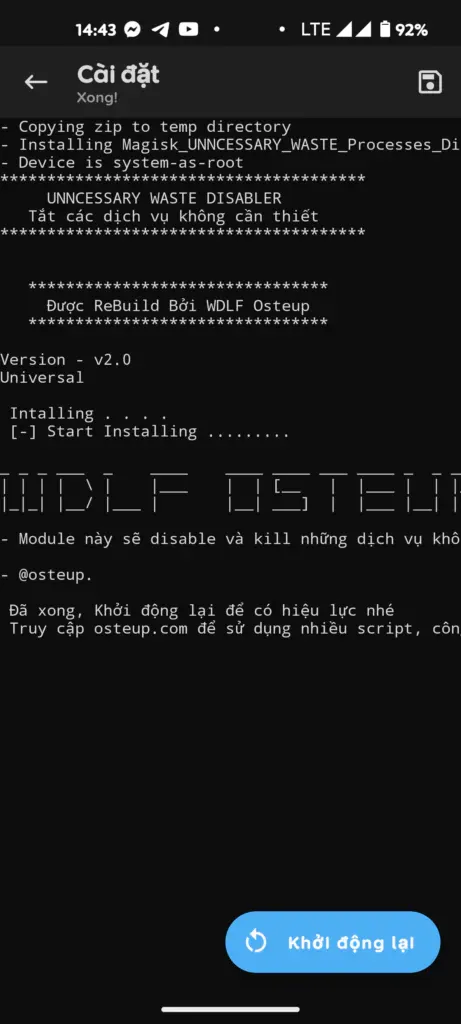
4. File Details & Download Links
- Root Requirement: This module is strictly packaged as a flashable root archive. It cannot function on unrooted devices or phones with locked bootloaders.
- Reverting to Defaults: If you ever need to restore standard logging services for application development, simply open Magisk, navigate to Modules, tap Remove next to this module, and reboot. All stock behaviors will be instantly restored.
5. Frequently Asked Questions (FAQ)
Does disabling these services break push notifications (WhatsApp, Telegram, etc.)?
No. The module only mutes internal OS diagnostic streams and kernel debugging interfaces. Cloud push notifications (Google Play Services / Firebase Cloud Messaging) operate through standard network socket pipelines that remain completely untouched.
Is this module compatible with KernelSU or APatch?
Yes. The archive follows standard Magisk Module Template specifications, making it fully compatible with systemless module loaders on both KernelSU and APatch.
Why is the module file size so small (~5 KB)?
Unlike performance modules that bundle compiled binaries or custom media assets, this module contains lean shell commands and system property definitions. It executes quickly during early boot to write toggle values directly into /sys and /proc kernel interfaces.
Is there any risk of bootloops when flashing this module?
The risk of a bootloop is virtually non-existent because no system binaries are replaced. In the rare event of an unexpected ROM conflict, you can easily disable modules via Magisk Safe Mode by holding the volume down button during device startup.
Related Articles

BrotX Optimizer v7: Rootless Android System Tuning via Shizuku ADB
Guide to rootless Android system tuning with BrotX Optimizer v7 via Shizuku ADB: enable ANGLE Vulkan GPU, 0ms floating window touch, 80% charge protection, and 58 flags.

iOS Debloat Script: Optimize Performance, Battery Life and Gaming FPS on Jailbroken iPhone
Complete guide to perf.sh iOS debloat script disabling 100+ telemetry and background daemons to reclaim RAM, eliminate thermal throttling, and boost gaming FPS.

OOptimize: Android 7-15 Gaming Tweaks (Root & No-Root)
Optimize SurfaceFlinger and GPU Vulkan pipeline on Android 7-15 with OOptimize: stabilize FPS, eliminate frame drops, and minimize touch input latency.

RAM Purger: Stop Background Processes & Boost Android Gaming Like iPhone
Complete guide to the rootless RAM Purger (frozen.sh) shell script terminating 400+ background app tasks to reclaim RAM and eliminate frame drops on Android.
Comments(0)
Sign in to join the conversation
Sign in with Google, Facebook or Email to leave a comment and get notified of replies.
No comments yet. Be the first to join the conversation!