
Android Smooth UI & Touch Latency Optimization Script (No Root)

Many budget and mid-tier Android smartphones experience sluggish touch response (elevated touch latency), micro-stutter while scrolling, and dropped frame animations across daily tasks despite having capable processor hardware. In most cases, aggressive power-saving governors implemented by OEM skins throttle SurfaceFlinger composition queues, touch sampling rates, and GPU rendering pipelines. Smooth UI Osteup is an advanced bash shell script (.sh) engineered to modify system properties (setprop) and hardware composition variables dynamically without requiring root access, delivering instantaneous touch responsiveness and fluid visual animations.
- Non-Intrusive Shell Scripting: Weighing roughly 7 KB, this lightweight bash script applies runtime property tweaks directly in system memory without modifying physical firmware partitions.
- Tangible Performance Gains: Minimizes SurfaceFlinger buffer latency, enforces hardware UI acceleration (HWUI), and sharpens touch sampling thresholds for responsive typing, navigation, and competitive mobile gaming.
- Zero Root Required: Executes seamlessly using standard on-device ADB shell environments such as Brevent or LADB (Android 11+) and Qute or Termux (Android 10 and older).
- Fully Reversible: Runtime
setpropadjustments are temporary; simply restarting your phone completely restores original manufacturer defaults.
1. Core System Parameters Optimized by the Script
The script dispatches a coordinated sequence of Android display subsystem optimizations:
| Optimized Parameter | System Mechanism | User Experience Improvement |
|---|---|---|
| SurfaceFlinger Buffering | Decreases display frame buffer backlogs | Dramatically closes the delay between tactile finger inputs and corresponding on-screen movements. |
| Hardware UI Acceleration (HWUI) | Directs graphical interface rendering directly to the GPU | Offloads interface compositing from the CPU, smoothing app opening and notification shade animations. |
| Touch Slop & Sensitivity | Refines initial touch recognition thresholds | Eliminates missed touch gestures and improves accuracy when tracking targets in competitive FPS games. |
| Composition Blending | Optimizes GPU display compositor pipelines | Stabilizes frame delivery, preventing jitter when browsing heavy web feeds or social media apps. |
2. Download the Smooth UI Osteup Script Archive (.zip)
Download the verified script package directly through the reliable high-speed mirrors below:
Download Smooth UI Osteup Script (Bash Shell Package)
Touch latency reduction and display rendering optimization script for Android
osteup
3. Step-by-Step Installation and Execution Guide
Executing the script takes only a minute and requires no PC tethering:
- Install an ADB Terminal Client: For Android 11 to Android 14+: Install Brevent or LADB (paired via Wireless Debugging in Developer Options). For Android 10 and older: Install Qute or Termux from your app repository.
- Extract the Script: Download
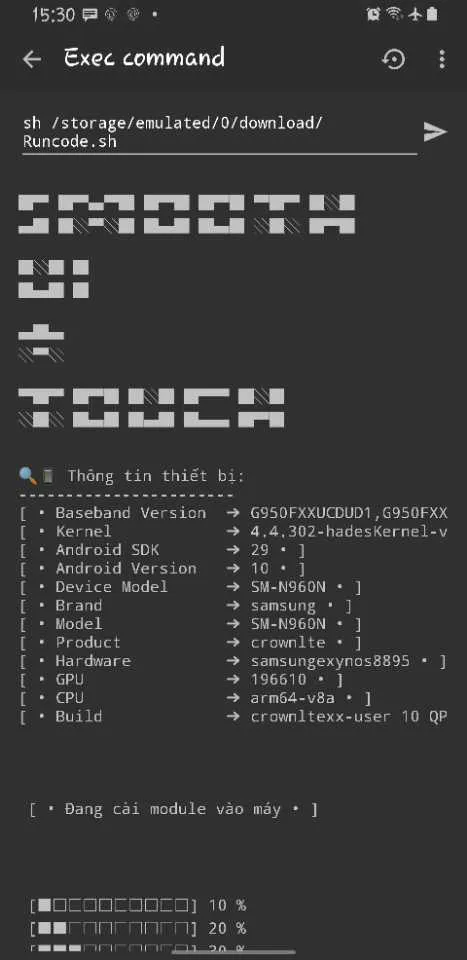
Smooth_UI_Osteup.zip, extract it using passwordosteup, and copyRuncode.shdirectly into your device's internal Download directory. - Trigger the Shell Command: Open your shell client (such as Brevent's Exec command or LADB's terminal), paste the following command, and execute:
sh /storage/emulated/0/Download/Runcode.shTip: Depending on your device's storage case-sensitivity, you may also specify sh /sdcard/Download/Runcode.sh.
4. Terminal Execution & Real-Time Status
| Script Execution in Terminal | Post-Optimization Responsiveness |
|---|---|
|
Once the script displays its completion status, users will immediately notice:
|
5. Battery Considerations and Reversion Guide
- Battery Trade-off: Because the GPU rendering pipeline and touch polling governors prioritize latency over sleep states, devices may feel slightly warmer and consume approximately 3% to 5% more battery during continuous use.
- How to Revert: Since runtime
setpropoverrides are stored purely in temporary RAM registers, simply Reboot your phone to instantly return all system values to their original factory configuration.
Related Articles

BrotX Optimizer v7: Rootless Android System Tuning via Shizuku ADB
Guide to rootless Android system tuning with BrotX Optimizer v7 via Shizuku ADB: enable ANGLE Vulkan GPU, 0ms floating window touch, 80% charge protection, and 58 flags.

iOS Debloat Script: Optimize Performance, Battery Life and Gaming FPS on Jailbroken iPhone
Complete guide to perf.sh iOS debloat script disabling 100+ telemetry and background daemons to reclaim RAM, eliminate thermal throttling, and boost gaming FPS.

OOptimize: Android 7-15 Gaming Tweaks (Root & No-Root)
Optimize SurfaceFlinger and GPU Vulkan pipeline on Android 7-15 with OOptimize: stabilize FPS, eliminate frame drops, and minimize touch input latency.

RAM Purger: Stop Background Processes & Boost Android Gaming Like iPhone
Complete guide to the rootless RAM Purger (frozen.sh) shell script terminating 400+ background app tasks to reclaim RAM and eliminate frame drops on Android.
Comments(0)
Sign in to join the conversation
Sign in with Google, Facebook or Email to leave a comment and get notified of replies.
No comments yet. Be the first to join the conversation!