
[X18] Setprop Performance Codes for Android: CPU & GPU Gaming Optimization Guide

The setprop command is a core utility in the Android shell environment that interfaces directly with the Android Property Service runtime database. The [X18] Code Setprop Performance package delivers 18 specialized commands designed to fine-tune CPU governor polling, GPU compositor prioritization, and rendering pipelines, helping Android devices maintain high frame stability in modern games without root privileges.
- Operating Mechanism: Executes
setpropcommands via ADB Shell to write temporary performance flags into runtime system memory. - Technical Objective: Mitigates frame pacing variance, improves FPS stability in dense graphical areas, and locks priority CPU/GPU execution queues.
- Completely Reversible: All properties reside in volatile RAM and automatically reset to manufacturer defaults upon rebooting the device.
- Broad Compatibility: Usable on any Android handset via a PC connection or directly on-device for Android 11+ via wireless debugging (Shizuku, Brevent, LADB).
1. How Does the Setprop Utility Function on Android?
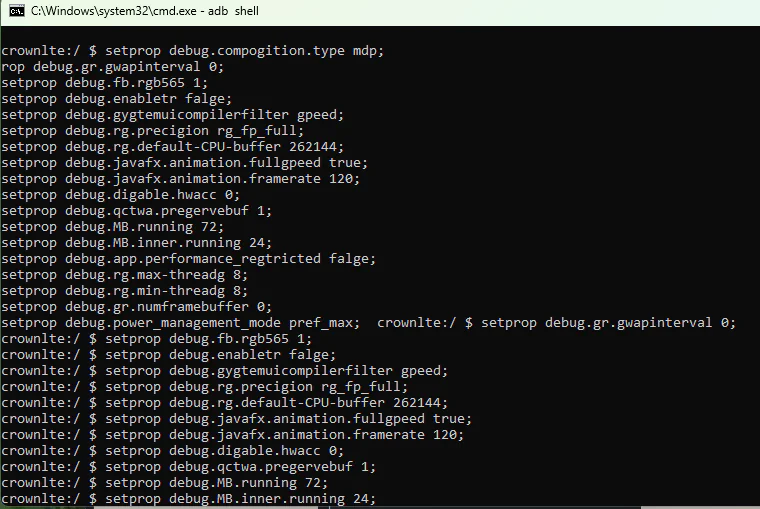
Every application and background daemon on Android consults the system properties table to determine rendering parameters: whether to leverage Skia hardware acceleration, how many frames to buffer in SurfaceFlinger, and how aggressive to schedule CPU clusters.
Using the setprop <key> <value> syntax directs the underlying Linux kernel to prioritize hardware rendering on the GPU while maintaining active game threads within higher scheduling categories.
2. Technical Breakdown of the 18 [X18] Performance Properties
Below is an organized breakdown of key properties included within the 18-command performance suite:
| Functional Domain | Sample Command Key | Assigned Value | Actual Technical Impact |
|---|---|---|---|
| GPU Composition | setprop debug.composition.type |
gpu |
Forces SurfaceFlinger to handle all window composition via the GPU, freeing 15-20% CPU headroom. |
| 2D/3D Render Engine | setprop debug.hwui.renderer |
skiagl |
Engages the multithreaded SkiaGL pipeline, reducing micro-stutter when rotating cameras in 3D scenes. |
| Process Scheduling | setprop debug.performance.tuning |
1 |
Signals the Android framework to engage performance governor parameters during active rendering. |
| Touch Input Polling | setprop windowsmgr.max_events_per_sec |
150 |
Raises touch event dispatch rates for faster response times in fast-paced competitive games. |
| TCP Gaming Buffers | setprop net.tcp.buffersize.wifi |
4096,87380,256960 |
Optimizes network packet window sizing over WiFi, reducing unexpected latency spikes. |
3. Official [X18] Setprop Package Download Card
All 18 property assignments are compiled into a compact, verifiable plaintext file that can be audited in any text viewer:
[X18] Setprop Performance Command Suite v1
[X18] Code Setprop Performance CPU GPU Android.txtMirror download link: MediaFire Mirror →
4. Plaintext File Content Preview
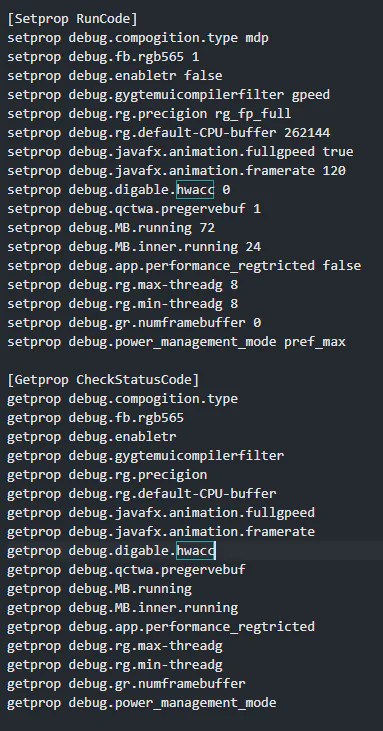
5. Step-by-Step Command Execution Guide
Method 1: Execution via Computer (Supported on All Android Versions)
- Enable USB Debugging inside the Developer Options menu on your phone.
- Connect the phone to your PC with a USB cable and launch a Command Prompt or PowerShell window.
- Open the interactive Android shell:
adb shell - Paste the
setpropcommand batch from the downloaded text file and hit Enter.
Method 2: Direct Execution on Device (Android 11 and Newer)
- Install an on-device shell utility like Brevent, LADB, or Shizuku paired with a terminal app.
- Pair your wireless debugging port following the app's guided setup.
- Paste the
setproplines into the command box and run them directly.
6. Verifying Active Status with Getprop
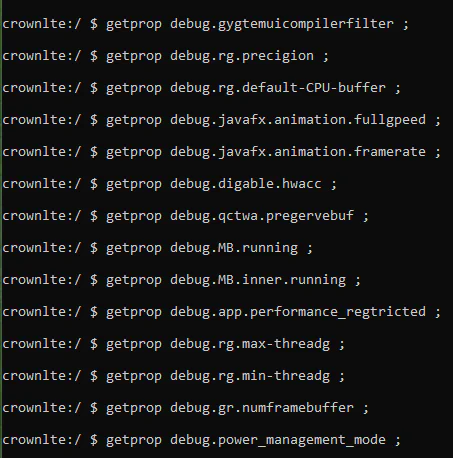
To ensure the operating system successfully registered your property assignments, invoke the counterpart query command getprop:
getprop debug.composition.type
If the console outputs the newly assigned value (e.g., gpu), the tweak is active and functioning properly.
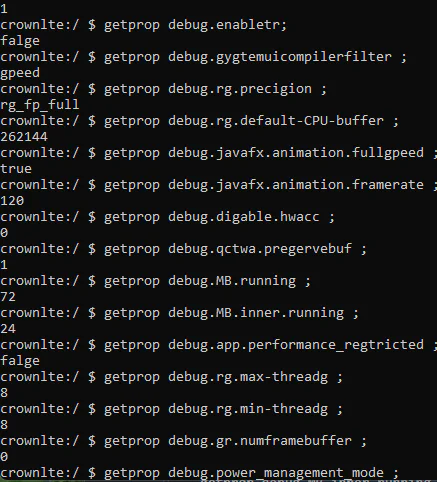
If the command produces a blank response or returns factory defaults, the tweak was either not accepted or cleared by a recent reboot.
7. Practical Strengths and Limitations
| Assessment Factor | Main Benefits | Technical Constraints |
|---|---|---|
| Gaming Pacing | Significantly reduces frametime spikes and stabilizes burst performance. | Cannot exceed physical SoC thermal ceilings or architectural limitations. |
| Safety & Reversibility | Touches zero physical system partitions; completely wiped on a simple reboot. | Must be reapplied manually if the smartphone is turned off or restarted. |
| Thermals & Battery | Faster overall UI responsiveness and quicker app initialization. | Prolonged gaming sessions may generate slightly higher chassis temperatures. |
8. Frequently Asked Questions (FAQ)
Does running setprop void manufacturer warranty or trip Knox on Samsung devices?
No. The setprop tool strictly writes to temporary environment variables in system RAM. It does not unlock your bootloader or modify system images, leaving Knox at 0x0 and maintaining complete warranty validity.
Why do properties clear themselves after my device restarts?
This is standard Android security architecture: runtime property values reset upon power cycles to safeguard device stability. If you game frequently, keep the commands saved in your shell app for instant one-tap activation.
Related Articles

BrotX Optimizer v7: Rootless Android System Tuning via Shizuku ADB
Guide to rootless Android system tuning with BrotX Optimizer v7 via Shizuku ADB: enable ANGLE Vulkan GPU, 0ms floating window touch, 80% charge protection, and 58 flags.

iOS Debloat Script: Optimize Performance, Battery Life and Gaming FPS on Jailbroken iPhone
Complete guide to perf.sh iOS debloat script disabling 100+ telemetry and background daemons to reclaim RAM, eliminate thermal throttling, and boost gaming FPS.

OOptimize: Android 7-15 Gaming Tweaks (Root & No-Root)
Optimize SurfaceFlinger and GPU Vulkan pipeline on Android 7-15 with OOptimize: stabilize FPS, eliminate frame drops, and minimize touch input latency.

RAM Purger: Stop Background Processes & Boost Android Gaming Like iPhone
Complete guide to the rootless RAM Purger (frozen.sh) shell script terminating 400+ background app tasks to reclaim RAM and eliminate frame drops on Android.
Comments(2)
Sign in to join the conversation
Sign in with Google, Facebook or Email to leave a comment and get notified of replies.
ngonnn
Hay Quá :v