
Zenless Zone Zero v1 Lag Fix Tool for Android Devices

Zenless Zone Zero (ZZZ), HoYoverse's dynamic urban action RPG, features lightning-fast character rotations, high-octane combat mechanics, and flashy neon particle effects. However, this high level of visual fidelity can be taxing for budget and mid-range Android devices. During intense Hollow exploration and chaotic Chain Attack combos, hardware often overheats, triggering thermal throttling and severe frame drops (plunging from 60 FPS down into the low 20s). The Tool Fix Lag Zenless Zone Zero v1 provides a shell-based optimization script that leverages native Android system scheduling and Ahead-of-Time runtime compilation to maximize framerate stability without modifying game files.
- Target Compatibility: Engineered specifically for the Zenless Zone Zero (Gamota Vietnam release) package on Android.
- Technical Approach: Utilizes Android Runtime (Dexopt) speed compilation and shell prioritization to pre-compile execution bytecode, eliminating JIT stutter and prioritizing CPU/GPU bandwidth.
- Reboot Persistence: Compiled optimizations remain active even after powering off or restarting the phone without needing to rerun the script.
- 100% Account Safe: Operates strictly through standard OS commands; no memory injection, no asset modding, and no tampering with OBB/Data directories.
- Complete Reversibility: Includes a built-in restoration script (
RestoreFixLagZenless_v1_osteup.sh) to return all package parameters to default in a single command.
1. How the ZZZ Fix Lag Tool v1 Optimizes Performance
Unlike illegal game file modifications that breach terms of service, this tool operates exclusively at the operating system layer through standard Android Shell interfaces:
- Dexopt Ahead-of-Time (AOT) Compilation: Compiles Zenless Zone Zero's core runtime bytecode into native machine code. This prevents the CPU from having to interpret and compile instructions on the fly (Just-In-Time) during hectic combat sequences, smoothing out micro-stutters when abilities trigger for the first time.
- Render Thread Scheduling Elevation (Process Renice): Directs performance cluster CPU cores toward the primary game process, minimizing display latency and ensuring instantaneous dodge button responsiveness.
- Background I/O Throttling: Temporarily restricts heavy background disk writes from custom vendor skins (MIUI/One UI/ColorOS) while the game occupies primary system RAM.
2. Performance Benchmark: Default vs. Tool v1 Optimized
Observed performance metrics on mid-range Android chipsets (such as Snapdragon 778G, Dimensity 1080, and Helio G99):
| Performance Metric | Default Out-of-the-Box | After Applying Tool v1 | Practical Gameplay Benefit |
|---|---|---|---|
| Combat FPS Stability | Drops steeply from 50+ FPS down to 20–25 FPS during Ultimate combos. | Maintains consistent 40–50+ FPS with minimal variance. | Seamless combo chains; no missed parry or dodge timings. |
| Asset Loading Latency | 1–2 second stutter when switching areas or spawning boss enemies. | Bytecode is pre-compiled; animations stream smoothly. | Eliminates freeze-frames when navigating Sixth Street or Lumina Square. |
| Thermal Buildup | Heats rapidly due to continuous JIT compiler CPU spiking. | Balanced processor load; thermal buildup slows down. | Delays and dampens aggressive hardware thermal throttling. |
| Reboot Behavior | Not applicable. | Dexopt machine code persists inside system cache. | Permanent; no need to re-execute after every power cycle. |
3. Step-by-Step Installation & Execution Guide
You can use any terminal or shell execution app available on Android. For Android 11 and newer, Brevent or LADB via Wireless Debugging is recommended; for Android 10 and older or rooted devices, you can use OsteBox, Qute, or Termux:
-
Download and extract the package: Download
ToolFixLagZZZMobile.zipfrom the download card below. Use an archive manager (such as ZArchiver) to extract it directly into your internal storageDownloaddirectory. You will have two files:FixLagZenless_v1_osteup.shandRestoreFixLagZenless_v1_osteup.sh. -
Verify file path capitalization: Ensure the files reside in the internal storage folder named
Download(capitalized D) matching the path/storage/emulated/0/Download/. - Launch your shell tool: Open your chosen terminal tool (such as Brevent's command tab or OsteBox's terminal window).
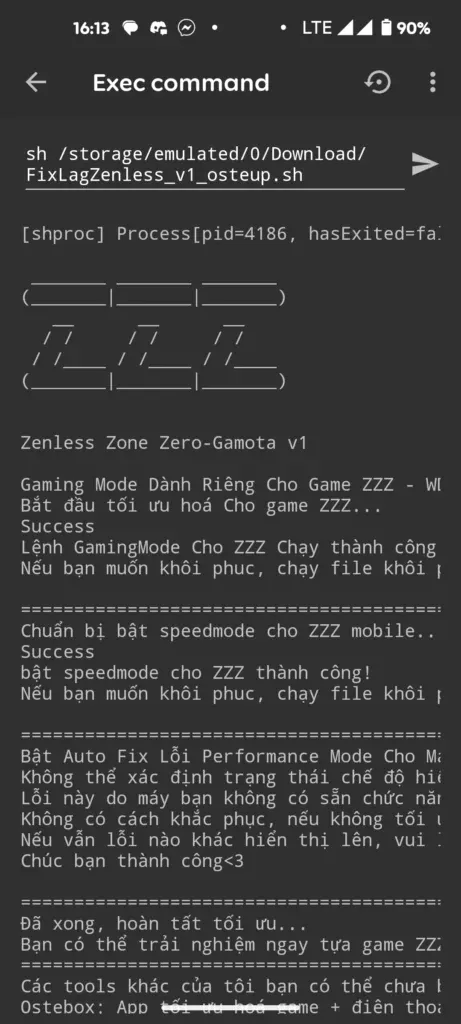
- Execute the optimization command: Copy and paste the exact command below into your terminal prompt and press Enter (or tap Run):
sh /storage/emulated/0/Download/FixLagZenless_v1_osteup.sh- Wait for completion: The script will inspect your installation and compile package binaries in approximately 10–30 seconds. Look for the completion message in the console output.
- Launch the game: Open Zenless Zone Zero and enjoy a noticeably more responsive combat experience.

4. File Details & Download Links
- "No such file or directory" Error: Android's underlying ext4/f2fs filesystem is strictly case-sensitive. Verify that your folder is named
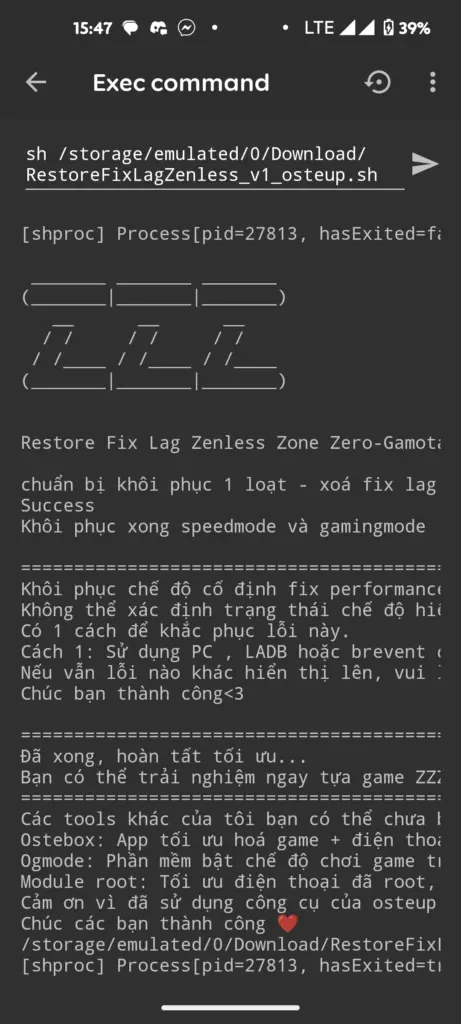
Downloadwith an uppercase D rather thandownload. - Restoring Stock Settings: If you ever wish to undo the optimization, simply run the bundled restore script in your terminal:
sh /storage/emulated/0/Download/RestoreFixLagZenless_v1_osteup.sh5. Frequently Asked Questions (FAQ)
Can using this tool trigger a ban from HoYoverse?
No. This script only utilizes legitimate Android OS management commands (such as dexopt ahead-of-time bytecode compilation and thread prioritization). It does not alter game files, inject into runtime memory, or modify asset archives (Data/OBB). HoYoverse's anti-cheat systems only penalize unauthorized file modifications and cheats.
Do optimizations reset when restarting or powering off the phone?
No. Ahead-of-time Dexopt compilation writes optimized machine code directly to the Android system package cache. Your optimizations will persist across system reboots and shutdowns without needing to run the script again.
Does this tool work on the Global edition of Zenless Zone Zero?
Version 1 of this tool is hardcoded to optimize the package identifier for the Zenless Zone Zero - Gamota edition distributed in Vietnam. If you are running the Global build from another region, the script will report that the target package was not found.
What in-game graphics settings are recommended for low-end devices?
For maximum fluidity on budget hardware, set in-game Resolution to Low or Medium, disable Motion Blur, and lower FX Quality, while keeping the Frame Rate setting at 60 FPS to ensure the smoothest touch feedback during combat.
Related Articles

BrotX Optimizer v7: Rootless Android System Tuning via Shizuku ADB
Guide to rootless Android system tuning with BrotX Optimizer v7 via Shizuku ADB: enable ANGLE Vulkan GPU, 0ms floating window touch, 80% charge protection, and 58 flags.

iOS Debloat Script: Optimize Performance, Battery Life and Gaming FPS on Jailbroken iPhone
Complete guide to perf.sh iOS debloat script disabling 100+ telemetry and background daemons to reclaim RAM, eliminate thermal throttling, and boost gaming FPS.

OOptimize: Android 7-15 Gaming Tweaks (Root & No-Root)
Optimize SurfaceFlinger and GPU Vulkan pipeline on Android 7-15 with OOptimize: stabilize FPS, eliminate frame drops, and minimize touch input latency.

RAM Purger: Stop Background Processes & Boost Android Gaming Like iPhone
Complete guide to the rootless RAM Purger (frozen.sh) shell script terminating 400+ background app tasks to reclaim RAM and eliminate frame drops on Android.
Comments(4)
Sign in to join the conversation
Sign in with Google, Facebook or Email to leave a comment and get notified of replies.
Restart máy có bị mất hiệu lực ko ạ?
Ờm….. Có thể làm thêm về fix lag zenless zone thêm có đc ko ạ, hứa sẽ trả phí mà