
[Root] Custom Font Modules for Android via Magisk & KernelSU

While Android's default Roboto typeface provides great readability, its ubiquitous appearance can feel monotonous over time. For rooted smartphone users, replacing the system-wide font has become straightforward and completely reversible thanks to Systemless Magisk Modules. This guide walks through customizing typography across your device, examines the real-world performance implications of font switching, and provides the download package for the popular Blackberrylove rounded custom typeface.
- Safe Systemless Mechanism: Custom font modules overlay virtual assets onto
/system/fonts/at boot without modifying physical system partitions, protecting your device against permanent bricking and maintaining compatibility with safety checks. - Device Prerequisites: An Android device rooted via Magisk, KernelSU, or APatch (fully compatible with Android 9 through Android 14+).
- Hardware Impact: Zero additional battery draw or processing overhead. The operating system handles font glyphs through its standard runtime typography cache.
- Blackberrylove Characteristics: Features smooth, softly curved character edges and relaxed letter spacing. Special Vietnamese dual-accent glyphs automatically fallback to standard typography to prevent empty character boxes.
1. Does Changing the System Font Impact Device Performance?
Users often question whether custom typography strains hardware resources or impairs gaming frame rates. In technical reality:
| Evaluation Metric | Measured Real-World Impact | Technical Explanation |
|---|---|---|
| CPU / GPU Consumption | Virtually 0% (unaltered) | Vector glyph paths are drawn by the standard hardware-accelerated 2D rendering pipeline just like stock fonts. |
| RAM Overhead | No perceptible increase | Android dynamically manages font caching per active application process, reclaiming memory as needed. |
| Visual Ergonomics | Refreshed, less cluttered interface | Softened geometric curves and balanced kerning make prolonged reading on high-refresh-rate displays more comfortable. |
2. Download Blackberrylove Font Module (Flashable ZIP)
Download the verified Magisk font archive directly from the high-speed mirrors below:
Download Blackberrylove Font Module for Android (Root)
Rounded systemless typography package for Magisk, KernelSU, and APatch
Do not extract the ZIP file — flash it directly inside your root manager
3. Step-by-Step Installation via Magisk & KernelSU
The entire installation takes place directly on your phone without requiring a PC or fastboot commands:
- Download the
.zipfont module using either link above and keep it in your local Download folder. - Launch your root manager app: Magisk, KernelSU, or APatch.
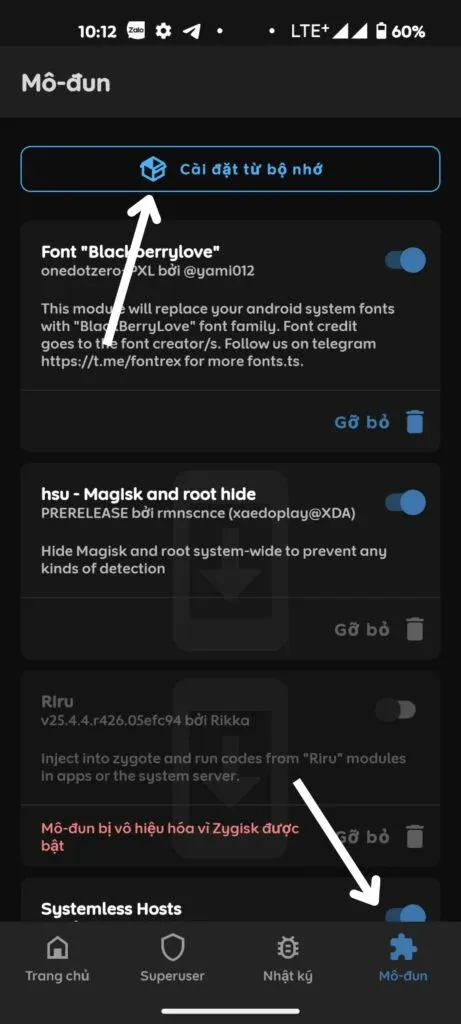
- Tap the Modules section located at the bottom-right corner.
- Select Install from storage.
- Navigate to your Download folder and select the downloaded font
.ziparchive. - Wait for the flashing script to complete. Once the terminal displays "- Done", tap Reboot to apply the new typography across all system frameworks.
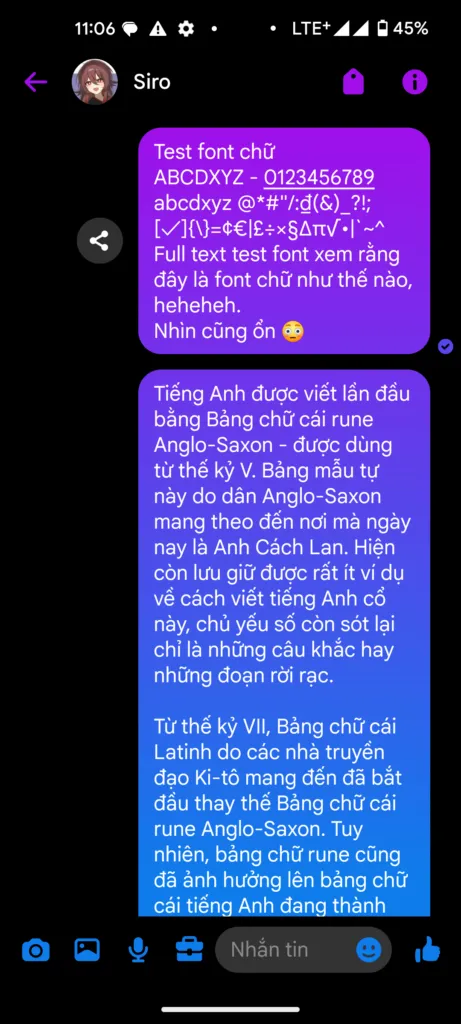
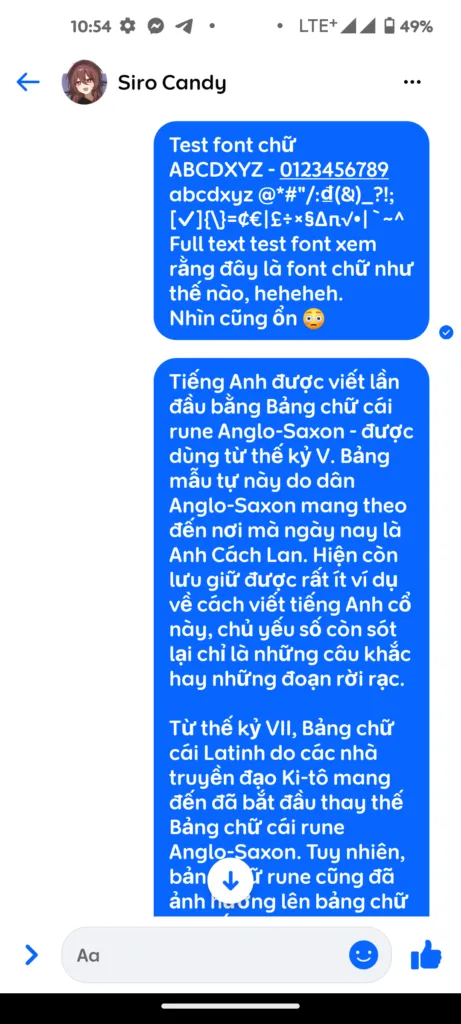
4. Visual Preview: Interface & Typography Transformation
The screenshots below demonstrate the module flashing process and the resulting typography within social media applications and system settings:
| Magisk Flashing Screen | Social App Display | System Settings Menu |
|---|---|---|
|
|
|
5. Advantages and Practical Considerations
| Notable Strengths | Important Considerations |
|---|---|
|
|
6. Removal & Troubleshooting Safeguards
- Reverting to Stock Typography: Open Magisk / KernelSU > Modules > toggle off the font module (or tap Remove) > Reboot. Your phone immediately restores the default Roboto font.
- Preventing Boot Conflicts: Before experimenting with multiple UI modifications, keep the Magisk Bootloop Protector module installed. If an incompatible script is flashed, it automatically disables modules on boot to restore normal operation.
Related Articles

BrotX Optimizer v7: Rootless Android System Tuning via Shizuku ADB
Guide to rootless Android system tuning with BrotX Optimizer v7 via Shizuku ADB: enable ANGLE Vulkan GPU, 0ms floating window touch, 80% charge protection, and 58 flags.

OOptimize: Android 7-15 Gaming Tweaks (Root & No-Root)
Optimize SurfaceFlinger and GPU Vulkan pipeline on Android 7-15 with OOptimize: stabilize FPS, eliminate frame drops, and minimize touch input latency.

RAM Purger: Stop Background Processes & Boost Android Gaming Like iPhone
Complete guide to the rootless RAM Purger (frozen.sh) shell script terminating 400+ background app tasks to reclaim RAM and eliminate frame drops on Android.

How to Lower Screen Resolution on Android for Maximum Gaming FPS
Step-by-step guide to downscale Android screen resolution without root: cut GPU load by up to 50%, prevent thermal throttling, and boost gaming FPS.
Comments(1)
Sign in to join the conversation
Sign in with Google, Facebook or Email to leave a comment and get notified of replies.
Cài lâu vãi như nó k chạy luôn ấy