
Windows Memory Cleaner: Lightweight RAM Optimizer & Standby List Purger for PC

When running demanding open-world games or resource-intensive content creation software on Windows 10 and 11, PC users frequently run into micro-stuttering and sudden frame rate drops. In many instances, the root cause lies within Windows' internal memory management behavior: the operating system retains gigabytes of cached data inside the Standby List rather than immediately relinquishing it when an active game requests fresh memory. Windows Memory Cleaner, an open-source project authored by developer Igor Mundstein, is an ultra-lightweight portable utility that executes native Windows memory management APIs to safely flush clogged memory pools without requiring a full computer restart.
- Standalone Open-Source Tool: Single executable (.exe) weighing roughly 132 KB. It requires zero installation and operates with no third-party DLL dependencies.
- Fixes Standby Memory Leaks: Purges the Windows Standby List, instantly converting inactive cached assets into genuinely Free Memory to eliminate game stutter in titles like Warzone, CS2, and GTA V.
- Automated Threshold Cleaning: Configurable to automatically trigger optimizations when available memory drops below a set percentage (e.g., 15% - 20%) or via a universal hotkey (
Ctrl + Alt + M). - Privilege Note: Requires Administrator privileges to invoke low-level system memory commands; occasional SmartScreen warnings represent false positives stemming from deep system integration.
1. Overview of the 6 Supported Memory Targets
Rather than forcibly terminating background processes like basic task killers, Windows Memory Cleaner invokes standard kernel calls to trim specific memory allocations safely:
| Memory Target | Action Performed | Practical Benefit to System Performance |
|---|---|---|
| Standby List | Clears all cached pages from standby pools | Crucial for Gaming: Frees dormant game caches into pure Free RAM, preventing frametime spikes during gameplay transitions. |
| Processes Working Set | Trims working sets across all user and system processes | Reduces memory reservations held by idle background tasks, returning capacity to the system. |
| System Working Set | Empties the operating system file system cache | Reclaims large amounts of RAM occupied after extensive file transfers or archive extractions. |
| Modified Page List | Flushes unsaved data buffers to disk and moves pages to standby | Commits pending disk operations reliably before clearing volatile memory space. |
| Combined Page List | Flushes combined page pools (when Page Combining is active) | Reduces duplicate memory footprints across concurrent application instances. |
| Standby List (Low Priority) | Clears only the lowest-priority standby items | A gentle optimization option that preserves responsiveness for recently accessed apps. |
2. Download Windows Memory Cleaner (Official Portable)
Download the verified portable executable directly from the reliable cloud mirrors below:
Download Windows Memory Cleaner (Portable Edition)
Open-source memory optimization and standby list purge utility for Windows PCs
osteup
3. Recommended Configuration for Gaming and Low-Spec PCs
After extracting WinMemoryCleaner.zip, right-click WinMemoryCleaner.exe and select Run as administrator. For optimal background operation without manual intervention:
- Memory Areas Selection: Enable Standby List, Modified Page List, and System Working Set. This combination thoroughly empties lingering caches without freezing active gaming sessions.
- Auto-Optimization Rules: Check
When free memory is belowand set the threshold slider to 15% - 20%. This guarantees that your PC cleans RAM automatically right before performance degrades. - General Settings: Check Start minimized and Run on startup to allow the utility to monitor resources quietly in the notification area.
- Global Hotkey: Retain or customize the global shortcut (such as
Ctrl + Alt + M) to trigger immediate optimization in-game without needing to Alt-Tab.
4. Graphical Interface & Notification Tray Indicators
| Configuration Interface | System Tray Status Monitoring |
|---|---|
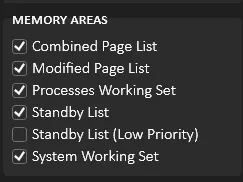
|
The system tray icon provides color-coded, real-time memory usage telemetry:
|
5. Headless Automation via Command-Line (NO GUI Mode)
Power users who prefer batch scripts or Task Scheduler integration can execute the utility silently with target parameters:
C:WinMemoryCleaner.exe /ModifiedPageList /ProcessesWorkingSet /StandbyList /SystemWorkingSetThis command executes in the background, clears all four designated memory structures, and immediately terminates without rendering an interface window.
6. Frequently Asked Questions & Operational Advice (FAQ)
This is a well-documented false positive. Because the utility invokes privileged Windows memory functions (EmptyWorkingSet, low-level process handles) and creates startup entries without costly enterprise code-signing certificates, security heuristics may flag it. The complete codebase is 100% public on GitHub, free of telemetry, and safe to use.
- Should I automatically trim "Processes Working Set" every few seconds? No. Forcing active software to dump their working sets causes immediate disk re-reads when you return to those windows, causing temporary hitching. Standby List purging is far more effective and completely non-disruptive.
- Where are preferences stored? All configurations are written directly into the current user's registry hive at
HKEY_CURRENT_USERSoftwareWinMemoryCleaner, leaving no junk files on your storage drive.
Related Articles

RimikoOS 11 PRO: Lightweight Windows 11 Lite OS for Low-End PCs & Gaming
Download RimikoOS 11 PRO (Build 22631.4112 23H2), a debloated Windows 11 Lite ISO with no telemetry, removed Edge, and optimized RAM for low-end gaming PCs.

How to Use Windows MSRT (Malicious Software Removal Tool)
Learn how to launch Microsoft Malicious Software Removal Tool (MSRT) using the mrt command to scan and remove worms, trojans, and malicious software on Windows 10/11.

Essential CMD & PowerShell Commands to Boost Windows 10/11 Performance
Master native Windows terminal tweaks: disable CPU-heavy RAM compression, unlock Ultimate Performance power scheme, and minimize gaming input latency.

Windows BCDEdit Optimization: Tweaks for Latency and FPS Stability
Learn how to configure Windows BCD store via elevated Command Prompt to optimize system timers, reduce DPC latency, and stabilize frame pacing in games.
Comments(2)
Sign in to join the conversation
Sign in with Google, Facebook or Email to leave a comment and get notified of replies.
so cái này với mem reduct thì như nào vậy ad???